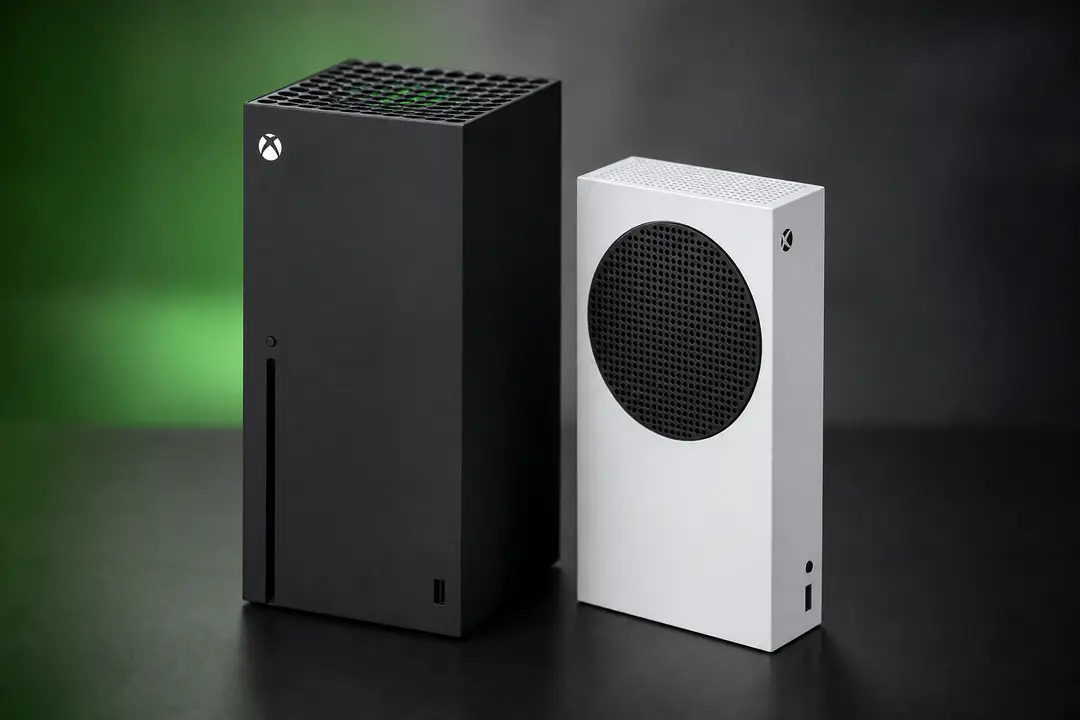
Xbox Series X vs Xbox Series S Compared
Xbox Series X and Xbox Series S are Microsoft’s current Xbox consoles, and the real choice comes down to performance, price, storage, and disc drive support. Both belong to the fourth generation of Microsoft’s Xbox family and the ninth generation of video game consoles, and both launched worldwide on November 10, 2020. They share the same Xbox Series X|S game library, the same Xbox Game Pass access, the same backward-compatible support for many Xbox One, Xbox 360, and original Xbox titles, and the same core features such as fast SSD loading and cloud storage for saved games. The difference is simple: one aims for higher-end 4K play and physical media, while the other trades power and storage for a much lower entry price. Quick verdict: Series X is the better all-around buy if your budget allows it, while Series S remains the smarter value pick for digital-first players on a tighter budget.
Quick Verdict
- Choose Xbox Series X if you want native 4K gaming, more storage, a Blu-ray drive, and the best version of multiplatform games.
- Choose Xbox Series S if you want the lowest-cost entry into Xbox Series X|S gaming and you are happy with digital downloads only.
- Both consoles support Xbox Game Pass, backward-compatible games, cloud storage, and Xbox Wireless Controller accessories.
- For most buyers who play on a 4K TV and want physical games or movies, Series X is the stronger long-term choice.
Key Differences at a Glance
| Feature | Xbox Series X | Xbox Series S |
|---|---|---|
| Release date | November 10, 2020 | November 10, 2020 |
| Introductory US price | US$499 | US$299 |
| Introductory UK price | £449 | £249 |
| Current listed model examples | 1TB, 1TB Digital Edition, 2TB Galaxy Black Special Edition | 512GB, 1TB |
| Storage | 1TB SSD on standard model | 512GB or 1TB depending on model |
| Target gaming resolution | True 4K | 1440p |
| Frame rate support | Up to 120 FPS | Up to 120 FPS |
| Media drive | 4K UHD Blu-ray drive on standard model | No disc drive |
| Game format | Disc and digital | Digital only |
| HDMI standard | HDMI 2.1 | HDMI 2.1 |
Xbox Series X Overview
The Series X starts from a premium position: Microsoft launched it at US$499 in the US and £449 in the UK, with a 1TB SSD and a built-in Ultra HD Blu-ray drive. It is the higher-performance option in the Xbox Series X|S family, built for native 4K output, higher visual settings, and stronger results in games that offer graphics or frame-rate modes. If you play major releases such as Halo, Madden NFL, or other EA Sports titles on a large 4K TV, Series X is the version designed to make that setup worthwhile.
Its hardware is also the more flexible choice for buyers who still own physical Xbox One games or movie discs. Because it includes a Blu-ray drive, you can use backward-compatible physical discs for supported older games, buy discounted boxed copies, and play 4K Blu-ray movies without a separate player. That matters more than it sounds, because a digital-only console locks you into digital distribution and digital downloads from day one.
Series X also gives you more room before storage becomes an issue. Modern Xbox Series X|S games are large, and the extra internal capacity helps if you install several multiplayer games, sports titles, and Game Pass downloads at once. It still benefits from a storage expansion card if your library grows quickly, but it starts from a more comfortable baseline.
- Best fit for 4K TVs and premium monitors
- Supports physical discs and digital purchases
- Includes Ultra HD Blu-ray movie playback
- More practical for large game libraries
Xbox Series S Overview
The Series S launched at US$299 in the US and £249 in the UK, which made it one of the cheapest ways into current-generation console gaming. Microsoft designed it around digital downloads, a smaller chassis, and a 1440p target rather than full native 4K. That lower entry price is the main reason it remains appealing: it runs the same Xbox Series X|S games, supports Xbox Game Pass, and still delivers fast loading through SSD storage.
For many players, the compromise works. If you mainly play through Game Pass, buy games digitally, and use a 1080p or 1440p display, the Series S covers the basics well. It also outclasses older Xbox One hardware in several current-generation cross-generation releases, with examples such as Diablo 4 and Assassin’s Creed Mirage showing notably smoother 60fps play on Series S than older last-generation hardware could manage.
The trade-offs are clearer over time. The base 512GB version fills quickly, especially if you keep several large games installed. There is no Blu-ray or Ultra HD Blu-ray support, so physical media is off the table for both games and movies. That makes Series S a cleaner fit for players who already prefer digital distribution and do not care about used discs, collector’s editions, or home theater playback.
- Lowest-cost entry into Microsoft’s next-gen consoles
- Small footprint and simple digital-first setup
- Strong match for Game Pass subscribers
- Less ideal for large local libraries on the 512GB model
Key Features
The biggest practical differences between these consoles come down to hardware, media support, compatibility, accessories, and long-term ease of use. The sections below break those areas into separate comparisons while keeping the same overall buying question in view.
Specs: Xbox Series X vs Xbox Series S
On paper and in practice, Series X has the stronger hardware. Both machines use modern Xbox Series X|S architecture with SSD storage, HDMI 2.1 connectivity, GDDR6 SDRAM memory, and PCIe 4.0 storage infrastructure for fast loading and Quick Resume. Both also support hardware-accelerated ray tracing, higher frame rates, and modern audio features such as Dolby Atmos and spatial audio. The gap is in how far each console can push those features at higher gaming resolution settings.
Series X is built to target true 4K output, while Series S is designed around 1440p. That does not mean every Series X game runs at native 4K or every Series S title stays fixed at 1440p, but it does set the performance ceiling. In multiplatform releases, Series X more often delivers higher internal resolutions, better image quality, and fewer visual cutbacks. Series S still gets the same game versions, but with more aggressive resolution scaling or reduced settings in demanding titles.
Winner: Xbox Series X. Series S is competent and good value, but Series X has the cleaner long-term specs advantage for sharp image quality, higher-end visuals, and better use of a 4K display.
| Spec area | Xbox Series X | Xbox Series S |
|---|---|---|
| Memory type | GDDR6 SDRAM | GDDR6 SDRAM |
| Storage interface | PCIe 4.0 SSD architecture | PCIe 4.0 SSD architecture |
| Video output | HDMI 2.1 | HDMI 2.1 |
| Ray tracing | Hardware-accelerated ray tracing | Hardware-accelerated ray tracing |
| Audio features | Dolby Atmos, spatial audio | Dolby Atmos, spatial audio |
Performance: Xbox Series X vs Xbox Series S
Series X is the more consistent performer in demanding modern games. It is the console to buy if you care about image quality and if you want the best chance of getting stronger visual modes in new releases. On a 4K TV, that difference is easier to spot in open-world games, detailed sports titles, and shooters where cleaner image reconstruction and higher texture quality matter.
Series S performs better than its price suggests, but it does so by aiming lower. In current-generation and late cross-generation games, it often targets 1080p to 1440p with 60fps options that still feel responsive. Diablo 4 is a good example of where Series S can impress: it has delivered a much smoother 60fps experience than older Xbox One X hardware in comparable cross-generation testing. Assassin’s Creed Mirage also shows that Series S can hold 60fps in a way that feels more current, even when resolution is lower than stronger systems.
The catch is that Series S gets less visual headroom. If your priority is the cleanest version of Halo or large AAA releases, Series X wins. Winner: Xbox Series X, because it keeps the same library while offering fewer compromises on frame rate and graphics settings.
Storage: Xbox Series X vs Xbox Series S
Storage is one of the biggest practical differences between these two consoles. A standard Series X gives you 1TB of SSD storage, while Series S comes in 512GB and 1TB versions. If you buy the cheaper 512GB Series S, available space becomes a real issue quickly once you install a mix of shooters, sports games, and large Game Pass titles.
That matters because Xbox Series X|S games are built for the internal SSD and high-speed storage pipeline. You can manage space by deleting games and re-downloading them, and cloud storage keeps saved games tied to your account, so progress is safe. Still, reinstalling large digital downloads is inconvenient if your connection is slow or if multiple people share the console. A storage expansion card helps both systems, but adding one raises the total cost of ownership and erodes the Series S price advantage.
Series X is simply easier to live with if you rotate between several games. Series S works best if you keep a smaller active library or choose the 1TB model. Winner: Xbox Series X, because its standard capacity is more realistic for current game sizes.
Media Support: Xbox Series X vs Xbox Series S
Series X is the only model here with full physical media support. It has a disc drive for Xbox games and movie playback, including Blu-ray and Ultra HD Blu-ray. That gives it two advantages at once: access to boxed games and a straightforward role in a living-room entertainment setup. If you already own Xbox One discs, supported backward-compatible titles are much easier to carry forward on Series X.
Series S removes that option completely. There is no disc drive, so all purchases must be digital downloads. That is fine for players who have already gone all-in on digital distribution and subscriptions, but it limits flexibility. You cannot borrow a disc, buy a cheaper used copy at retail, or use the console as a Blu-ray player. For home theater users who care about Dolby Atmos, surround sound, and physical 4K movie playback, Series X is the only fit of the two.
This category has the clearest separation. Winner: Xbox Series X, because it handles both gaming and multimedia options without locking you into digital-only purchases.
Game Pass Compatibility
Xbox Game Pass is one area where the two consoles are on equal footing. Whether you choose Series X or Series S, you get access to the same subscription library, the same day-one first-party releases, and the same account features. If your plan is to use Game Pass as your main way to play, Series S becomes easier to justify because the service reduces the need to buy discs at all.
Backward compatibility is also a shared strength. Both systems play many backward-compatible Xbox One, Xbox 360, and original Xbox games, and both support cross-generation compatibility for accessories and saved games through cloud storage. The difference is format access. Series X can use supported physical discs as well as digital ownership, while Series S is limited to digital versions of backward-compatible titles.
Controller support is straightforward too. Existing Xbox One pads work, and the current Xbox Wireless Controller works across the Xbox Series X|S family. That helps if you are upgrading an older setup or buying extra controllers for local multiplayer in games like EA Sports releases, Halo, or family-friendly titles.
- Both support Xbox Game Pass
- Both run many backward-compatible Xbox One, Xbox 360, and original Xbox games
- Both support cloud storage for saved games
- Both work with Xbox One accessories and the Xbox Wireless Controller
Players interested in upcoming platform releases often compare console choices alongside major software calendars such as Forza Horizon 6 news, because first-party and racing titles tend to show the clearest resolution and frame-rate gaps on different hardware.
Accessories
Accessory compatibility is not a major divider between these consoles, which is good news for anyone upgrading from Xbox One. The Xbox Wireless Controller remains the standard pad across the range, and Microsoft’s ecosystem is built for controller compatibility across generations. Headsets that support Dolby Atmos or other spatial audio formats also make sense on either system if you want stronger surround sound in competitive games.
The setup difference comes from how you buy and store content. Series X suits mixed households that use discs, own older games, and want a movie player in the same box. Series S suits a cleaner digital shelf with subscriptions, digital downloads, and fewer physical accessories. If you need more room later, both can use a storage expansion card rather than relying only on external USB drives for older game storage.
- Xbox Wireless Controller works across Xbox Series X|S
- Xbox One controllers remain useful for upgrades and extra local players
- Storage expansion card support matters more on Series S 512GB
- Dolby Atmos and spatial audio accessories benefit both consoles
If you follow wider platform news, Microsoft’s hardware plans and studio activity often show up in stories such as the Xbox union update, which can matter if you are weighing long-term platform support and first-party output.
Pricing
The original pricing split remains one of the strongest arguments in Series S’s favor. Series X launched at US$499 and £449, while Series S launched at US$299 and £249. That US$200 gap was large enough to make the Series S an easy entry point for Game Pass users, families buying a second console, and players moving up from older Xbox One hardware.
Current listings show more model variation than at launch. Series X is sold in 1TB form, a 1TB Digital Edition, and a 2TB Galaxy Black Special Edition. Series S is available in 512GB and 1TB forms. Once you compare actual shopping carts, though, the cheaper box is not always the cheaper long-term setup if you need more storage soon after purchase.
| Console | Launch price US | Launch price UK | Current storage options |
|---|---|---|---|
| Xbox Series X | US$499 | £449 | 1TB, 1TB Digital Edition, 2TB Galaxy Black Special Edition |
| Xbox Series S | US$299 | £249 | 512GB, 1TB |
If you plan to stay all-digital and keep only a few games installed, Series S still has the better upfront value. If you expect to add a storage expansion card, buy many large games, or use physical media, Series X closes the value gap quickly.
Players comparing hardware costs with software habits often pair that decision with broader gaming gear upgrades such as headsets, extra controllers, and displays, because those extras can matter as much as the console itself.
Pros and Cons
Pros
- Xbox Series X delivers stronger 4K performance and better visual headroom.
- Xbox Series X includes Blu-ray and Ultra HD Blu-ray support for games and movies.
- Xbox Series S offers a much lower starting price.
- Both consoles support Xbox Game Pass, backward-compatible titles, and cloud storage.
- Both work with the Xbox Wireless Controller and many Xbox One accessories.
Cons
- Xbox Series X costs significantly more at entry.
- Xbox Series S has no disc drive, so physical media is unavailable.
- Xbox Series S 512GB storage fills quickly with modern game installs.
- Series S makes more noticeable compromises in gaming resolution and visual settings.
- Adding a storage expansion card reduces the Series S price advantage.
Who Should Choose What
Choose Xbox Series X if you play on a 4K TV, want the best-looking version of multiplatform games, or care about physical media. It is also the better option if you already own Xbox One discs, buy boxed games on sale, or want one console that handles both gaming and Blu-ray movie playback. Players who rotate between Halo, big open-world games, and annual sports releases such as Madden NFL will benefit from the extra storage and stronger performance ceiling.
Choose Xbox Series S if you want the cheapest route into Microsoft’s current ecosystem and you already buy games digitally. It makes the most sense for Game Pass-heavy users, secondary-room setups, players with a 1080p or 1440p screen, and anyone who treats the console as a compact subscription machine rather than a full home theater hub. The 1TB Series S is the safer pick than the 512GB model if you install several games at once.
Final Verdict
Xbox Series X is the better overall console for most buyers. It offers more storage, stronger 4K performance, better multimedia options, and full disc support, which makes it the easier recommendation if your budget stretches to it. Xbox Series S is still a good buy for digital-first players who want lower prices and solid access to Xbox Game Pass, but it works best when you accept its limits on storage and physical media from the start.
If you want one clear answer, Series X is the smarter long-term purchase. If price is the deciding factor and digital downloads are already your norm, Series S remains a practical and capable alternative.
FAQs
What is the main difference between Xbox Series X and Xbox Series S?
The main differences are performance, storage, and media support. Series X targets 4K gaming, includes a Blu-ray drive, and comes with more standard storage, while Series S targets 1440p and is digital only.
Do both consoles play the same games?
Yes. Both are part of the Xbox Series X|S family and support the same current-generation game library, including first-party releases and Xbox Game Pass titles.
Can Xbox Series S play discs?
No. Xbox Series S has no disc drive, so it cannot play game discs, Blu-ray movies, or Ultra HD Blu-ray discs.
Are Xbox One games backward-compatible on both systems?
Many Xbox One, Xbox 360, and original Xbox games are backward-compatible on both systems. Series X can use supported physical discs and digital versions, while Series S supports digital versions only.
Do Xbox One controllers work on Xbox Series X|S?
Yes. Xbox One controllers are compatible, and the Xbox Wireless Controller works across both consoles as well.
Is Xbox Game Pass the same on Series X and Series S?
Yes. Both consoles offer the same Xbox Game Pass access, so the choice between them does not change the subscription library.
Which Xbox is better for 4K TVs?
Xbox Series X is the better match for a 4K TV. It is built for true 4K output and better visual settings, while Series S is designed primarily around 1440p gaming.