Notion 3.8 for AI Hub
Teams searching for “Notion 3.8 for AI hub” want to know whether Notion can answer questions using company knowledge and automate routine work. Its usefulness depends on how much team knowledge is in the workspace, which external apps are connected, and what access controls apply. The version number alone does not confirm when any particular AI feature was released.
Notion AI Hub Capabilities at a Glance
Capability | What it does | Version or availability note |
|---|---|---|
AI Search | Finds and synthesizes workspace information | No verified 3.8-specific change |
Connected-source search | Searches linked external team content | Connector-dependent; no verified 3.8-specific change |
Notion AI | Answers questions using workspace context | No verified 3.8-specific change |
Custom agents | Run task-specific workflows | Plan- and credit-dependent; no verified 3.8-specific change |
Meeting notes | Transcribe and summarize meetings | No verified 3.8-specific change |
Database Autofill | Populates database properties with AI | No verified 3.8-specific change |
Model support | Uses Anthropic, OpenAI, and Notion-hosted models | Access varies by product |
How Notion Uses Workspace Context
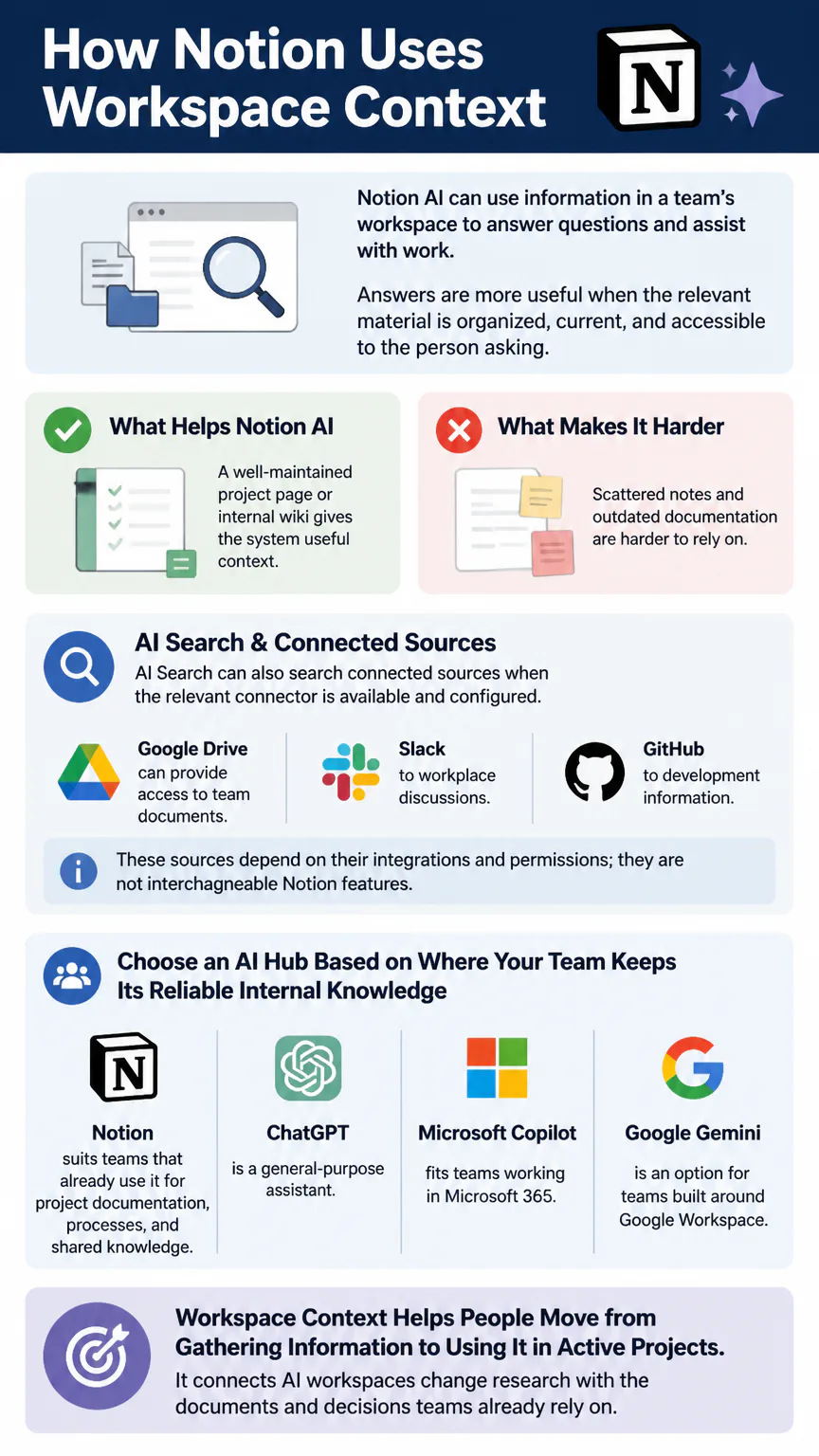
Notion AI can use information in a team’s workspace to answer questions and assist with work. Answers are more useful when the relevant material is organized, current, and accessible to the person asking. A well-maintained project page or internal wiki gives the system useful context; scattered notes and outdated documentation are harder to rely on.
AI Search can also search connected sources when the relevant connector is available and configured. Google Drive can provide access to team documents, Slack to workplace discussions, and GitHub to development information. These sources depend on their integrations and permissions; they are not interchangeable Notion features.

Choose an AI hub based on where your team keeps its reliable internal knowledge. Notion suits teams that already use it for project documentation, processes, and shared knowledge. ChatGPT is a general-purpose assistant, Microsoft Copilot fits teams working in Microsoft 365, and Google Gemini is an option for teams built around Google Workspace.
Workspace context helps people move from gathering information to using it in active projects. It connects AI workspaces change research with the documents and decisions teams already rely on.
What Teams Can Automate in Notion
Notion’s AI features can support knowledge work and recurring workspace tasks. Meeting summaries can turn discussions into written records, while database autofill can populate properties from page content. Custom agents can handle recurring, task-specific workflows.
Meeting follow-up: Transcribe and summarize a meeting, then capture decisions and action items in the team’s workspace.
Database updates: Use AI to fill properties such as summaries or status-related details from existing content.
Recurring team tasks: Configure a custom agent for a defined workflow, such as preparing a briefing or following up on project tasks.
Cross-app knowledge work: Use information from sources such as Slack, Google Drive, or GitHub when the relevant connector is enabled.
Give agents a narrow task and clear access boundaries. Test workflows that update a shared database or use connected information with representative content before relying on them in routine team operations.
When teams follow the same steps and handoffs each time, an API mindset for systemizing work can connect that recurring work across tools and reduce the need for one-off fixes as the team grows.
Plans, Integrations, and Security
Notion Free costs $0 per month. Plus costs $10 per member per month with annual billing, and Business costs $20 per member per month with annual billing. Extra Agent Credits cost $10 per 1,000 credits. The total cost of team AI workflows depends on plan eligibility and agent-credit use.
Connected apps require careful setup and access management. Connector permissions sync hourly. Data from a disconnected connector is purged within 24 hours, while embeddings for deleted workspace content are removed within 60 days. Embeddings are processed representations of content used by AI search; their removal schedule differs from deletion of the original page or file.
Before connecting a source, decide which teams and roles should be able to retrieve its information through Notion. Check connector permissions against workspace access, especially for Slack discussions, shared Drive files, and private development information in GitHub. Keep access rules consistent across the workspace and connected apps.
Connecting AI tools to a workspace raises questions about who can access the information and how it’s protected. Those safeguards are part of why data security matters as teams add more systems to their workflows.
How to Set Up a Notion AI Hub
Start with the team’s existing knowledge and workflows. Connect external sources only when they add context the team needs.
Create a Notion workspace and select a plan that fits the team’s membership and AI requirements.
Organize core knowledge into clear areas for policies, projects, meeting records, and team processes.
Review page access and assign workspace permissions before inviting the full team.
Connect relevant sources, such as Google Drive, Slack, or GitHub, where the integration is available and appropriate.
Test AI Search and Notion AI with real team questions, checking whether answers respect the intended access boundaries.
Set up a custom agent for one repeatable workflow, then check its output before expanding its responsibilities.
Invite teammates, explain where key information belongs, and assign someone to keep shared knowledge current.
Begin with a small group and a limited set of sources. You can catch documentation gaps, permission problems, and weak agent instructions before they affect more of the workspace.
Is Notion a Good AI Hub for Your Team?
Notion makes sense when the team already keeps its internal knowledge, projects, or operating processes there. AI Search and workspace-aware answers depend on current, well-organized pages. Custom agents and database automation can also keep routine work close to the records the team uses.
Notion may be a less natural fit if most team knowledge lives in another ecosystem or the main need is a standalone conversational assistant. ChatGPT, Microsoft Copilot, or Google Gemini may better match the team’s existing tools and daily habits. Notion can still serve as a knowledge hub alongside them; include connector access, permissions, and plan costs in the decision.
FAQs
Is Notion overkill for personal use?
Not necessarily. Notion’s Free plan costs $0 per month and can suit someone who wants notes, projects, and reference material in one workspace. Its AI hub and team-agent features matter more when you have shared knowledge or recurring work to manage.
Is Notion AI free?
The Free plan includes a one-time trial of 20 Notion AI responses, not unlimited ongoing AI use. Notion AI is included with Business and Enterprise plans; custom agent use also depends on plan access and credits.
Can you use Notion on Mac?
Yes. Notion has a Mac desktop app available to download.
Does Notion allow NSFW content?
Notion prohibits sexually explicit content and other material that violates its policies, including child sexual abuse material and nonconsensual intimate imagery. Non-explicit adult topics may be allowed when they comply with those policies.
Is Notion still relevant in 2026?
Yes. Notion remains a relevant workspace and knowledge-management tool in 2026.
Can I connect my AI to Notion?
Notion AI uses workspace context, and AI Search can search supported connected sources such as Slack, Google Drive, or GitHub when configured. These connectors bring external content into Notion search; they are separate from connecting an external assistant such as ChatGPT directly to Notion.
What is Notion 3.8, and is there a tutorial, GitHub project, or download?
“Notion 3.8” is not established here as an official release with specific AI features. Notion’s official app is available from Notion; any tutorial or GitHub project using that label is separate from the official app and release.
Conclusion
Notion can serve as a team AI hub when the workspace contains dependable knowledge and the required integrations and permissions are in place. Treat “3.8” as a version label, not proof that these capabilities were introduced in that release. Assess Notion against your team’s workflows and plan needs.