1pasword Got Hacked
1Password detected a security incident on November 19, 2026, involving an employee’s corporate GitHub account. Some customer account details were exposed, but customer vault contents and the secrets needed to unlock them were not accessed. The distinction matters: account metadata could help scammers create targeted phishing messages, while passwords and other information stored in vaults remained protected.
Information exposed in the 1Password incident
Data category | Reported status | Technical exposure and specifics |
|---|---|---|
Customer names | Accessed for a subset of customers | Names downloaded |
Login email addresses | Accessed for a subset of customers | Email addresses downloaded |
Account creation dates | Accessed | Creation timestamps downloaded |
Last-login dates | Accessed | Last-access timestamps downloaded |
Customer vault contents | Not accessed | Passwords, notes and card details untouched |
Customer account passwords | Not accessible to 1Password | Master passwords unavailable to servers |
Secret Keys | Not accessible to 1Password | Unavailable to servers |
MFA settings and second-factor tokens | Not compromised | Configurations and seed tokens untouched |
Watchtower-linked vault items | Not accessed | Vault items untouched |
Account and user identifiers | Accessed | Numeric account and file IDs; software-version metadata |
Emailed invitation and recovery tokens | Accessed | Copied from SCIM Bridge, provisioning and recovery links; require additional sign-in or email verification |
Public keys | Accessed | Public-facing keys; no security impact |
Secure Remote Password parameters | Accessed | Copied; cannot be used to access accounts |
Source code and CI/CD secrets | Accessed | Private repository code and pipeline secrets; internal credentials rotated |
What happened in the incident
1Password detected the intrusion on November 19, 2026. The attacker used an employee’s corporate GitHub account to reach internal systems and push malicious code. The activity involved systems that could access administrative customer data, including the account details listed above.
This was an intrusion involving an internal corporate account, not a reported takeover of customers’ individual 1Password accounts. 1Password has millions of customers and serves more than 200,000 businesses, but the number of customer accounts whose details were accessed has not been disclosed. The company’s size does not show how many people were affected.
What the exposed account details mean
Names, login email addresses, account creation dates and last-login dates are account metadata. They can identify someone as a 1Password customer and give scammers details to make fraudulent messages sound more convincing. This information is separate from the passwords and private data stored inside a vault.
These details do not provide the credentials needed to sign in. Treat unexpected account messages cautiously, and never share your password, Secret Key or verification code in response to one.
Even if encrypted vault contents weren’t accessed, reused passwords can put other accounts at risk. Credentials can also be stolen directly from a device; one case involved a malicious Cemu build targeting Linux users for password theft.
Why vault contents were reportedly safe
Customer vault contents were not accessed. 1Password also cannot access customers’ account passwords or Secret Keys. Those credentials help protect and unlock vault data, so their reported status is central to the assessment that saved logins and other vault items remained safe.
MFA settings and second-factor tokens were not compromised, and apps and extensions were not affected. Watchtower-linked vault items were not accessed. There was also no indication that Have I Been Pwned was compromised or exposed.
These findings describe the reported scope of this incident; they do not eliminate every account-security risk. A reused or compromised password, a stolen device or a convincing phishing attempt could still put an individual account at risk, independently of this intrusion.
What 1Password users should do
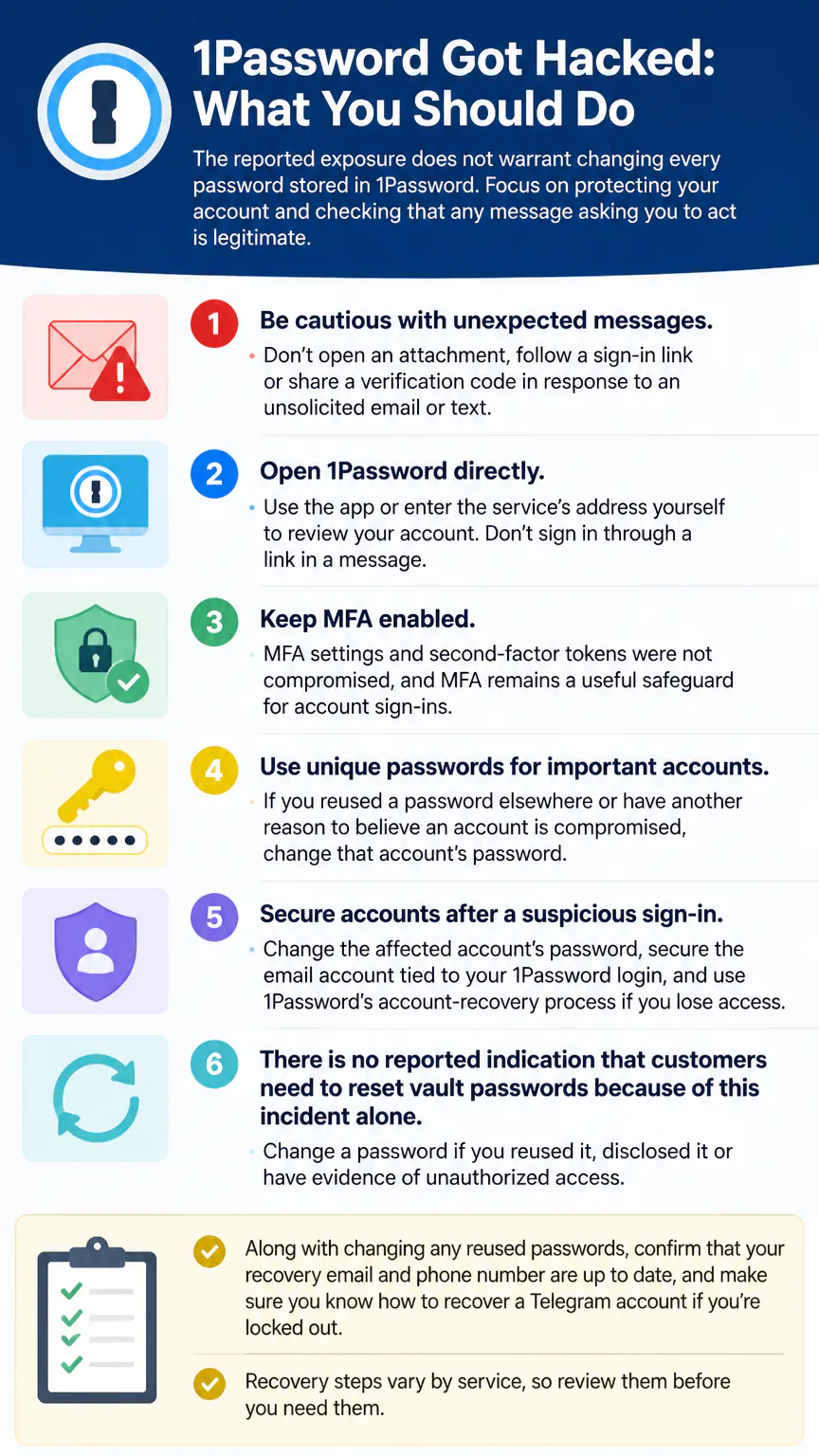
The reported exposure does not warrant changing every password stored in 1Password. Focus on protecting your account and checking that any message asking you to act is legitimate.
Be cautious with unexpected messages. Don’t open an attachment, follow a sign-in link or share a verification code in response to an unsolicited email or text.
Open 1Password directly. Use the app or enter the service’s address yourself to review your account. Don’t sign in through a link in a message.
Keep MFA enabled. MFA settings and second-factor tokens were not compromised, and MFA remains a useful safeguard for account sign-ins.
Use unique passwords for important accounts. If you reused a password elsewhere or have another reason to believe an account is compromised, change that account’s password.
Secure accounts after a suspicious sign-in. Change the affected account’s password, secure the email account tied to your 1Password login, and use 1Password’s account-recovery process if you lose access.
There is no reported indication that customers need to reset vault passwords because of this incident alone. Change a password if you reused it, disclosed it or have evidence of unauthorized access.
Along with changing any reused passwords, confirm that your recovery email and phone number are up to date, and make sure you know how to recover a Telegram account if you’re locked out. Recovery steps vary by service, so review them before you need them.
How to recognize phishing attempts
Exposed names and email addresses could help scammers personalize messages, even though vault contents remained protected. Watch for urgent claims that your account will be closed, your vault has been exposed or you must confirm your Secret Key or MFA code. The incident does not establish that such messages have been sent, but these are common warning signs.
Check the sender and destination address carefully; a familiar display name does not verify the sender.
Never provide your account password, Secret Key or one-time verification code in reply to a message.
If a message claims there is a problem with your account, open the app or service directly to check.
Personal details can make a phishing attempt seem convincing, but they don’t make the request legitimate. Treat unexpected calls with the same caution: don’t share passwords or payment information, and verify the request through an official channel, especially if an unknown number claims to represent Amazon scam calls.
What is still unknown
The number of affected customers has not been disclosed, so the incident’s reach cannot be determined from the reported details. The method used to gain access to the employee’s corporate GitHub account has also not been disclosed. The unknowns do not change the reported distinction: account metadata was accessed, while customer vault contents were not.
Has 1Password Been Breached Before?
The incident described here was a corporate-system intrusion detected on November 19, 2026. The available details do not establish an earlier breach of 1Password or its customers’ vault contents. A security incident involving company infrastructure is different from a breach of the encrypted vaults customers use. There is no verified earlier event in the available record to describe as a 1Password customer-vault breach. That does not prove no security issue has ever occurred; it means the reported record does not substantiate a prior incident of that kind.
Recent Password Manager Breaches
In December 2022, LastPass disclosed a breach after an attacker accessed a cloud-storage environment using data taken during an earlier incident. The stolen backup included encrypted customer vault data and some unencrypted customer information. That exposure differed from 1Password’s reported incident, which involved account details but no access to customer vault contents.
How the LastPass Breach Differs
LastPass’s 2022 incident involved copies of encrypted customer vault backups, as well as some unencrypted customer information. In the 1Password incident described here, customer vault contents were not accessed. The reported data exposure was different in each case.
Encrypted vault copies can remain a target for offline guessing if a customer’s master password is weak, reused or otherwise obtained, even though encryption is intended to protect their contents. The reported 1Password incident instead involved account and internal-system information, with no access to customer vault data. These summaries describe the reported incidents; they do not mean every customer faced the same individual risk.
FAQs
Is 1Password actually secure?
The November 2026 incident shows that internal systems can be targeted. The reported findings say customer vault contents and the credentials 1Password cannot access remained protected. No password manager eliminates every risk, so use a unique account password, keep MFA enabled and watch for phishing.
How can I check whether my email was exposed?
Search your email address in Have I Been Pwned to see whether it appears in known data breaches. A result does not confirm whether your details were accessed in this 1Password incident.
Can Have I Been Pwned check a phone number?
Have I Been Pwned’s breach lookup searches email addresses, not phone numbers. Phone numbers were not listed among the customer details accessed in this incident.
What should I do after a breach alert?
Check which account and data the alert concerns, then change any exposed or reused password and enable MFA on that account. Avoid links in unsolicited alerts; go directly to the service instead.
Conclusion
1Password reported that customer account details were accessed, but vault contents and the secrets needed to unlock them were not. Watch for personalized phishing, and change passwords only if there is another reason to believe they were exposed or reused.