N8n: Practical Explainer for Beginners
n8n is a fair-code workflow automation platform with AI, self-hosting, 1500+ integrations, templates, and flexible pricing.
n8n offers 1500+ integrations, supports custom JavaScript or Python, and lets you build AI-powered automations on cloud or your own infrastructure. It matters because it gives teams a single place to design, test, run, and monitor complex processes without giving up control over code, hosting, or data. For readers comparing its meaning, pricing, workflow setup, and support for AI agents or self-hosting, it brings those core details together in one product.
What is n8n?
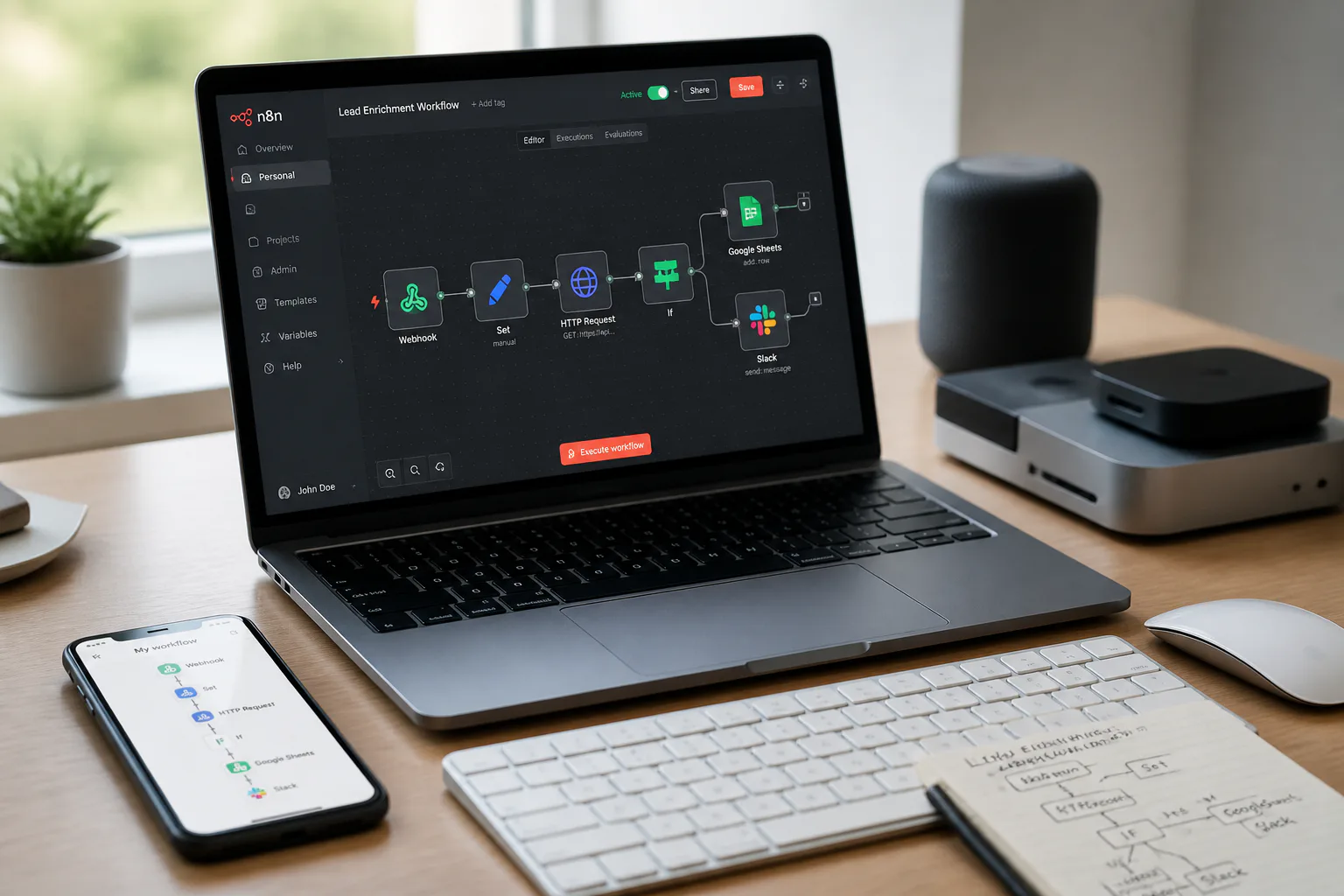
n8n combines a visual builder with code-level flexibility. In the Workflow Editor, you create workflows by placing nodes on a canvas, connecting services and API calls, and adding custom logic where needed. The platform also includes native AI capabilities, including the AI Assistant (preview) and support for building AI agents and multi-step AI workflows with your own data, models, and tools.
At a high level, a workflow in n8n is a collection of connected nodes that automate a process. That process can be simple or highly technical, depending on what you build. n8n is also fair-code licensed and has source code available on GitHub under a Sustainable Use License, which is one reason it is popular with technical teams that want transparency and control.
n8n supports both hosted and self-hosted use. You can run it in the cloud, or deploy it on your own infrastructure with Docker, Kubernetes, or npm. For teams that care about access control and governance, higher plans add features such as SSO, SAML, LDAP, audit logs, log streaming, multi-user workflows, and Git-based version control.
Start n8n
- Choose how you want to run it: use the hosted version or start locally on your machine.
- For a local setup, run npx n8n or deploy an n8n Docker container.
- Open the editor at http://localhost:5678 to access the main interface.
Create a New Workflow
- Open the Workflow Editor.
- Click the New Workflow button.
- Use the editor canvas as your workspace, then add nodes from the sidebar.
Add Nodes and Configure
- In the Workflow Editor sidebar, browse Integrations (Nodes).
- Select the integration nodes you need for your process.
- Configure each node’s parameters, then add custom JavaScript or Python code if your workflow needs extra logic.
Test Workflow
- Run the workflow inside the Workflow Editor.
- Test it with real or mock data.
- Use the logs view to debug problems, replay steps, and inspect inputs and outputs.
Save and Activate Workflow
- Save the workflow after configuration and testing.
- Activate it so it can run automatically or via triggers supported by your workflow setup.
Monitor Executions
- Open Execution History.
- View logs, search executions, and review workflow activity.
- Analyze workflow metrics to understand performance and catch errors early.
n8n also stands out for scale and community. It offers 9000+ workflow templates, has a community of more than 200,000 members, and its GitHub repository has nearly 200k stars. That combination of templates, code flexibility, AI support, and deployment choice is what makes the platform useful for both first workflows and advanced operational systems.
What Does n8n Stand For?
n8n stands for nodemation. The name reflects how the platform works: you build automations from nodes inside a visual workflow. That branding fits the product well because the node-based editor is central to how users design, test, and manage workflows.
Name Meaning
The term blends the idea of nodes with automation. Instead of writing everything from scratch, you assemble connected steps visually and add code only where it helps.
How to Pronounce n8n
n8n is pronounced n-eight-n. That is the standard pronunciation used for the product name and the clearest way to say it in conversation, demos, and training.
Simple Pronunciation Tip
Read the 8 as the spoken word “eight,” so the full name becomes n-eight-n.
n8n Pricing Overview
|
Plan |
Price |
Includes |
|---|---|---|
|
Starter |
€20/month |
2,500 workflow executions per month, 2,300 AI credits per month, AI Assistant (preview) |
|
Pro |
€50/month |
10,000 workflow executions per month, up to 13,700 AI credits per month, AI Assistant (preview) |
|
Business |
€667/month |
Self-hosting support, SSO, SAML, LDAP, version control, scaling options |
|
Enterprise |
Custom pricing |
Advanced enterprise features and deployment options |
These prices are billed annually, with discounts built into that billing structure. Starter fits getting started, Pro suits solo builders and small teams, and Business or Enterprise are designed for larger organizations that need governance, self-hosting, and scaling features.
What the Plans Change
- Monthly workflow execution volume
- Monthly AI credit allocation
- Access to self-hosting and enterprise controls
- Identity and governance features such as SSO, SAML, and LDAP
How to Use n8n
Step-by-step guide to building and activating workflows in n8n
Follow the Basic Workflow
- Start n8n locally or in the hosted UI, then open the Workflow Editor.
- Click New Workflow to create a blank workflow.
- Add nodes from the sidebar using the integrations you need.
- Configure node settings and add JavaScript or Python if needed.
- Run the workflow with test data.
- Check logs, replay steps, and fix errors.
- Save the workflow and activate it.
- Monitor future runs in Execution History.
Use the AI Features
If your plan includes it, the AI Assistant (preview) is available inside the workflow editor to help build workflows faster. n8n also supports AI agents and multi-step AI workflows using your own data, models, and tools, which makes it useful for teams building more advanced automation paths.
Know What a Workflow Includes
A workflow is made of connected nodes. Some nodes represent integrations, while others can handle API calls or custom code. That structure keeps the visual layout easy to follow while still allowing technical depth when you need it.
Exploring n8n Templates
Why Templates Help
n8n offers more than 9000 workflow templates. Templates reduce setup time because you start from a working structure instead of a blank canvas, then adjust nodes and parameters for your own use case.
What Templates Are Good For
- Learning how workflows are structured in the Workflow Editor
- Speeding up early setup for common integrations
- Understanding how multi-step AI workflows are arranged
- Adapting existing patterns instead of building from zero
How to Work With Them
Use templates as a starting point, then open them in the Workflow Editor and inspect each node. From there, you can swap integrations, change parameters, add custom code, and test the full workflow in the logs view before activation.
How to Self-Host n8n
Choose Your Deployment Method
- Select one of the supported self-hosting methods: Docker, Kubernetes, or npm.
- Prepare your own infrastructure, whether on-premises or in a private cloud.
- Deploy n8n using your chosen method and open the editor interface.
Understand Editions
- All self-hosted installations use the same core product.
- Without a license key, n8n runs as the free Community edition.
- Add a Business or Enterprise license key to enable those editions.
Plan for Operations
- Use Business or Enterprise if you need features such as version control, SSO, SAML, LDAP, or scaling support.
- Monitor workflow runs through Execution History and logs after deployment.
- Use Git-based Version Control if your team needs workflow diffs and managed change tracking.
Self-hosting is a strong fit when you need more control over infrastructure, data location, or internal access policies. Because the product remains the same at its core, the main difference is how you deploy, license, and operate it.
FAQs
Can n8n build AI agents?
Yes. n8n supports AI agents and multi-step AI workflows using your own data, models, and tools, and the AI Assistant (preview) helps inside the workflow editor.
Is n8n open source?
n8n is open source in the sense that its source code is available on GitHub, and it uses a Sustainable Use License with a fair-code approach.
How many integrations and templates does n8n have?
It offers more than 1500 integrations and over 9000 workflow templates.
What is n8n on GitHub?
The GitHub repository contains the product’s source code and plays a major role in its community presence. It has nearly 200k stars, which reflects broad developer interest and contribution activity.
Conclusion
n8n combines visual workflow building, code flexibility, AI features, and hosting choice, making it a practical option for teams that want automation without giving up control.
Further Reading