How to Build a Professional Website with AI: From Draft to Launch
Building a professional website with AI starts with choosing a workflow that suits your coding experience and the type of site you need. AI tools can generate a multi-page draft from details about your audience, site purpose and visitor goals. Before launch, replace generic content with your own, check that features work and review the site carefully.
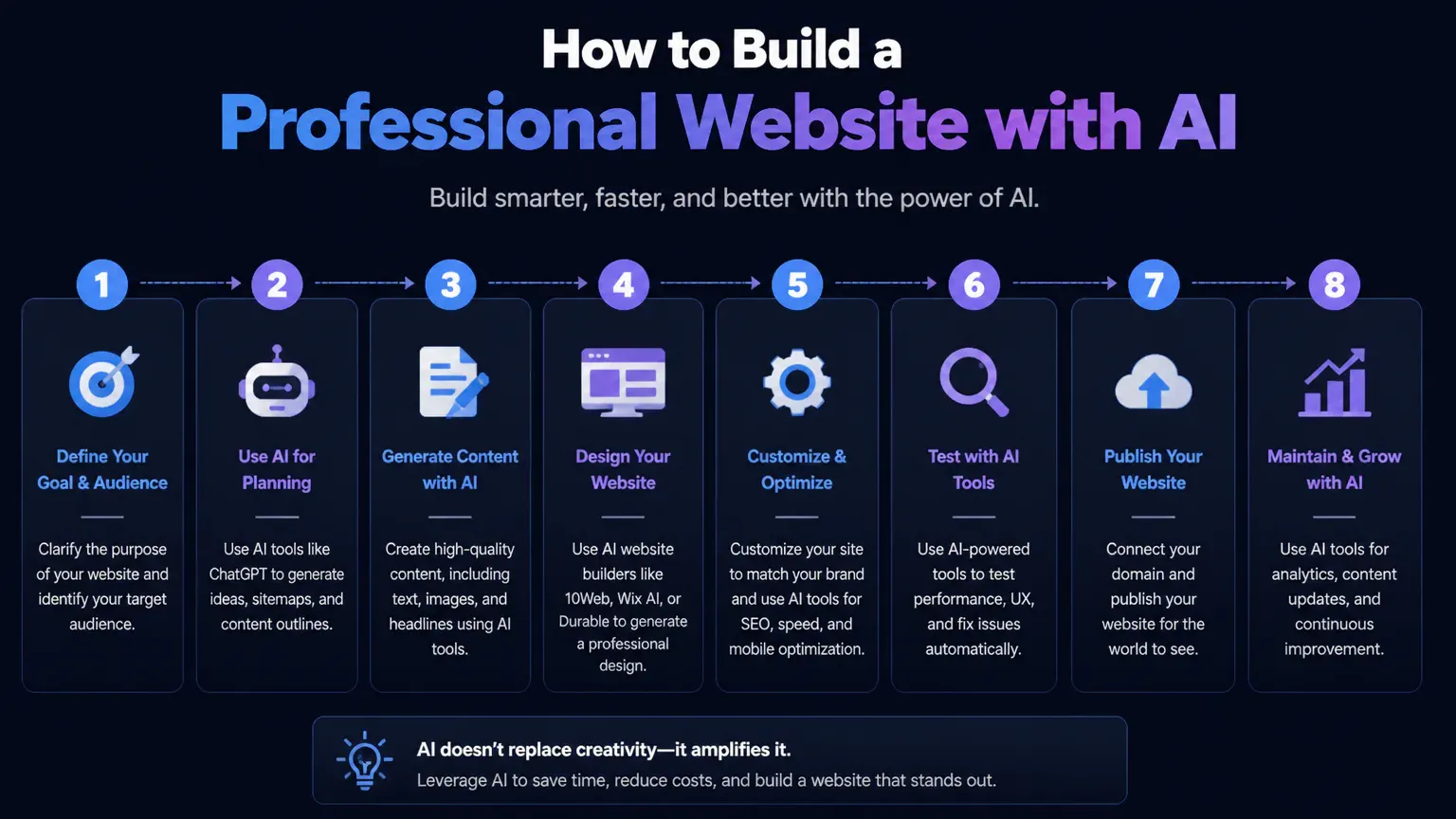
Build and publish a website with AI
Choose an AI website builder, design tool or coding workflow based on your site’s needs and your technical experience.
Define the site’s purpose, audience, pages, visitor goals, required features and visual direction.
Generate a first draft and review its layout, page structure, copy and imagery.
Replace generic content with accurate text and suitable images, then apply your brand colors, typography and page hierarchy.
Add and configure the features visitors need, such as a contact form, scheduling, online sales or member access.
Test the site on desktop and mobile, including breakpoints, links, forms and interactive elements.
Review accessibility, search visibility, privacy disclosures, legal content and factual accuracy before launch.
Publish to a platform subdomain or connect a custom domain to your hosting setup.
If you plan to sell products, a polished homepage is only part of the job. Customers also need clear product details, a reliable checkout, and order confirmations. Plan those features before deciding whether a general AI website builder will do or building a thriving online store on Shopify is a better fit.
Choose an AI website-building workflow
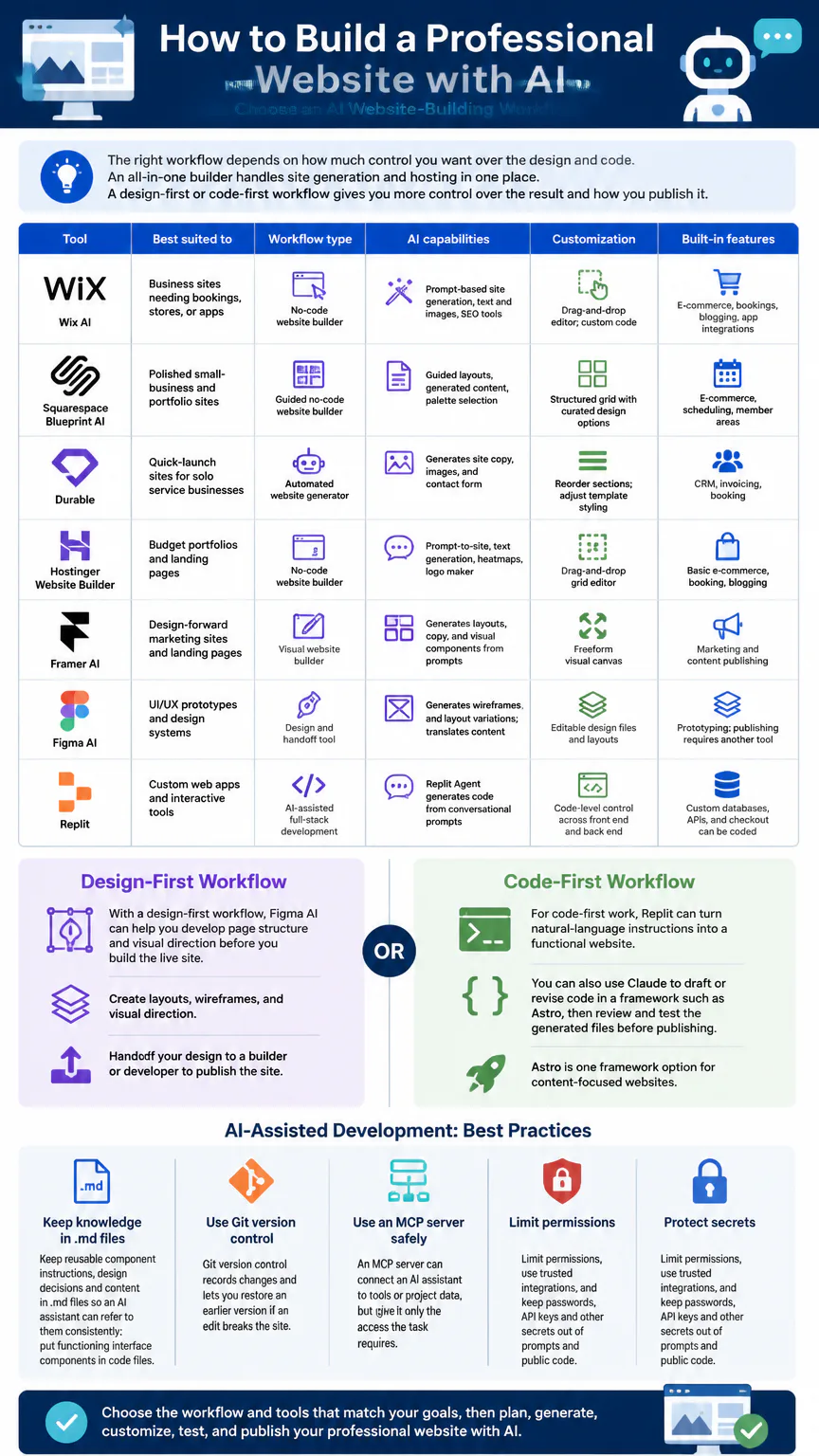
The right workflow depends on how much control you want over the design and code. An all-in-one builder handles site generation and hosting in one place. A design-first or code-first workflow gives you more control over the result and how you publish it.
Tool | Best suited to | Workflow type | AI capabilities | Customization | Built-in features |
|---|---|---|---|---|---|
Wix AI | Business sites needing bookings, stores, or apps | No-code website builder | Prompt-based site generation, text and images, SEO tools | Drag-and-drop editor; custom code | E-commerce, bookings, blogging, app integrations |
Squarespace Blueprint AI | Polished small-business and portfolio sites | Guided no-code website builder | Guided layouts, generated content, palette selection | Structured grid with curated design options | E-commerce, scheduling, member areas |
Durable | Quick-launch sites for solo service businesses  | Automated website generator | Generates site copy, images, and contact form | Reorder sections; adjust template styling | CRM, invoicing, booking |
Hostinger Website Builder | Budget portfolios and landing pages | No-code website builder | Prompt-to-site, text generation, heatmaps, logo maker | Drag-and-drop grid editor | Basic e-commerce, booking, blogging |
Framer AI | Design-forward marketing sites and landing pages | Visual website builder | Generates layouts, copy, and visual components from prompts | Freeform visual canvas | Marketing and content publishing |
Figma AI | UI/UX prototypes and design systems | Design and handoff tool | Generates wireframes and layout variations; translates content | Editable design files and layouts | Prototyping; publishing requires another tool |
Replit | Custom web apps and interactive tools | AI-assisted full-stack development | Replit Agent generates code from conversational prompts | Code-level control across front end and back end | Custom databases, APIs, and checkout can be coded |
With a design-first workflow, Figma AI can help you develop page structure and visual direction before you build the live site. For code-first work, Replit can turn natural-language instructions into a functional website. You can also use Claude to draft or revise code in a framework such as Astro, then review and test the generated files before publishing.
Astro is one framework option for content-focused websites. Keep reusable component instructions, design decisions and content in .md files so an AI assistant can refer to them consistently; put functioning interface components in code files. Git version control records changes and lets you restore an earlier version if an edit breaks the site.
An MCP server can connect an AI assistant to tools or project data, but give it only the access the task requires. Limit permissions, use trusted integrations, and keep passwords, API keys and other secrets out of prompts and public code.
Write a prompt that defines the site
A useful prompt gives the AI enough information to make decisions about structure and style. Describe visitors and their needs, not just the kind of business. “A portfolio for a UX designer seeking product roles” gives the tool more direction than “a design website.”
Purpose and audience: State what the site offers and who should use it.
Pages and content: Name the required pages and the information each should contain.
Visitor actions: Specify what visitors should do, such as book an appointment, request a quote or view case studies.
Features: Request only the functions the site needs, including forms, scheduling, payments or member access.
Visual direction: Describe the mood, colors, typography, image style and any accessibility needs.
Limits: Identify existing brand assets, required wording and content or design choices to avoid.
For example: “Create a three-page portfolio for a UX designer applying for product design roles. Include a home page, an about page, and case study pages with the problem, process, and outcome. Use a dark mode palette, readable text, and clear links to contact me. Make the layout work on phones and desktop.” Check the result against your prompt. AI-generated text and images are drafts, not proof that claims, permissions or details are correct.
Customize the draft around your brand
Generated layouts may include generic claims, stock imagery or sections that do not reflect your business. Replace them with approved brand material and give each page a clear purpose. Make the service offered, location or service area, and next step easy to find.
Replace placeholder copy with accurate descriptions, prices, policies and contact details.
Use original or properly licensed images, and add descriptive alt text when an image conveys information.
Apply consistent brand colors, typography, button styles and spacing across pages.
Remove sections that do not support the site’s purpose, and revise headings so the content is easy to scan.
Test each form, booking flow, payment step and account feature with realistic entries.
For frequently updated content, you can connect a content management system such as Sanity. Puck is a visual page editor for React sites. Choose a content setup that suits the people who will maintain the site, and test the editing process before relying on it for routine updates.

Test mobile, accessibility, and SEO
Preview the site at narrow and wide screen sizes. A layout that looks polished on a laptop may hide buttons, crop images or make forms difficult to use on a phone. Test navigation, links, search and any purchase or booking flow, not just the appearance. Ask someone unfamiliar with the draft to complete the main visitor task and note where they get stuck.
Responsive behavior: Check text size, image cropping, menus, spacing and buttons at mobile and desktop widths.
Accessibility: Review color contrast, heading order, image alt text, form labels, keyboard navigation and screen-reader behavior.
SEO: Give each page a useful title and heading structure, write concise descriptions, and use clear page URLs and internal navigation.
Accuracy and privacy: Confirm business details, claims, prices and policies. Explain relevant data collection and include privacy or legal content appropriate to the site.
Functionality: Submit forms, follow links, and complete test transactions or bookings as a visitor would.
Automated checks catch some issues, but they do not replace keyboard use, screen-reader testing or a human review of the content. Accessibility and privacy obligations depend on the site and how it handles visitor information, so treat this checklist as a quality review, not a legal determination.
A page can look polished on a phone and still be hard to use with a keyboard or screen reader. Test key tasks such as navigating menus, completing forms, and accessing image descriptions, then check the site against recognized website accessibility standards.

Connect a domain and publish
A platform subdomain is a quick way to put a draft online. A custom domain gives the site a consistent address for customers and marketing. Builder access, domain registration, hosting and business features may be charged separately, so include each in your ongoing budget.
Choose whether to launch on the builder’s subdomain or connect a domain you control.
Set the domain’s DNS records as required by the hosting service, then allow time for the changes to take effect.
Publish the reviewed site and confirm that the domain loads securely and that key pages and forms work.
Save the project files and configuration in version control so you can recover from unwanted changes.
Netlify and GitHub Pages support free static-site publishing setups for AI-generated HTML and CSS. Cloudflare is another hosting and deployment option for code-based sites. A content management system or server-dependent feature may need a different setup from a simple static site, so match the hosting configuration to the site’s functions.
Publishing your site doesn’t guarantee it will appear in search results or AI-generated answers. Clear page structure, useful original content and consistent business details give search engines and AI systems stronger signals. This broader approach is called generative engine optimization.
FAQs
Can AI build a fully functional website?
Yes. AI builders and coding tools can create working pages and features, but the result depends on the tool, the prompt and the site’s complexity. Test every visitor-facing function and review the content before launch.
Can I build a professional website with AI for free?
Yes. You can publish a static site through a free setup on Netlify or GitHub Pages, and some builders offer a platform subdomain. A custom domain, removal of platform branding or business features may require a paid plan.
Can a Website Make $10,000 a Month?
AI can help you create a website, but building one does not guarantee a particular income. Earnings depend on the offer, customers, pricing and execution.
Can a Website Make $1,000 a Day?
AI website tools do not guarantee daily earnings. Income depends on the business model, demand, pricing and sales.
Which free AI website builder should I choose?
Choose based on the features your site needs and each plan’s limits. Free options and included features vary, so check current plan details before committing.
Are Reddit recommendations for AI website builders reliable?
Treat community recommendations as anecdotal; what works depends on the project. Compare suggestions against your required features, desired control over the site and ongoing costs.
Conclusion
Use AI to speed up the first draft, then treat the site as a real business asset that needs accurate content, working features and hands-on review. Start with a workflow that meets your needs, test the site before publishing, and improve it as you learn how visitors use it.