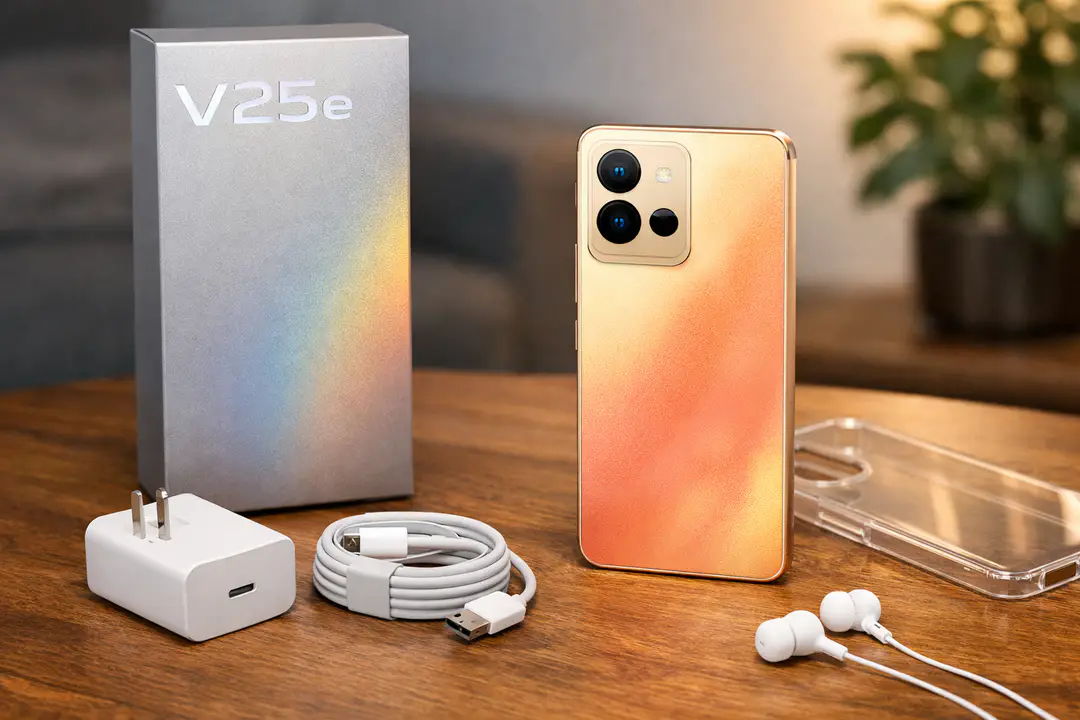
vivid2201 Guide: vivo V25e (V2201) Specs
vivid2201 refers to the vivo V25e (model V2201), an international-market midrange smartphone announced Aug 30, 2022 and released Sept 7, 2022. Its biggest selling points are a bright 90Hz AMOLED display, the efficient Mediatek Helio G99 (6 nm) platform, and a stabilized 64 MP main camera with OIS for more consistent everyday photos and video.
If you’ve ever searched a model code from a retail listing, a software update screen, or a used-phone marketplace and ended up with “vivid2201,” you’re not alone. Model identifiers can be confusing because they’re often used in firmware, support pages, and carrier inventories rather than in marketing. The good news: once you map the code to the device, you can quickly verify which features you’re actually getting—screen quality, network support, camera hardware, and whether storage expansion is available.
This guide breaks down what the V25e (V2201) is, how to identify it correctly, and what its real-world strengths and limits look like. You’ll also learn what to check before buying—especially in second-hand or cross-border listings—so you don’t accidentally end up with the wrong variant or mismatched accessories.
What is vivid2201? Overview and device identity
The key takeaway: vivid2201 is a model identifier used for the vivo V25e, specifically model V2201, and it’s most useful for confirming hardware and software compatibility.
- Marketing name: vivo V25e
- Model code: V2201 (often surfaced as vivid2201 in software/firmware contexts)
- Announced: 2022, August 30
- Released: 2022, September 07
- Software at launch: Android 12 with Funtouch 12
Manufacturers and Android builds frequently use internal codenames and model strings to separate regional builds, hardware batches, and update tracks. In practical terms, “vivid2201” shows up when you’re reading a firmware package label, checking system information, troubleshooting with support, or validating a handset’s authenticity in a resale listing.
Why it matters: two phones can look identical in photos, yet differ in connectivity bands, memory configurations, or even camera behavior depending on the software branch. When you use the correct identifier (V2201), you’re better equipped to choose the right accessories, confirm that OTA updates match your device, and avoid purchasing a “similar but not the same” model that shares a design language with the V25 series.
Quick overview — vivo V25e (V2201) at a glance
The key takeaway: the V25e targets buyers who want an AMOLED panel, reliable midrange performance, and a stabilized main camera without stepping into flagship pricing.
- Body: 159.2 x 74.2 x 7.8 mm; 183 g
- Display: AMOLED, 90Hz, 1300 nits (peak), 1080 x 2404 pixels, ~409 ppi, screen-to-body ratio (~84.7%)
- Chipset: Mediatek Helio G99 (6 nm)
- CPU/GPU: Octa-core (2×2.2 GHz Cortex-A76 & 6×2.0 GHz Cortex-A55); Mali-G57 MC2
- Main camera: 64 MP, f/1.8, PDAF, OIS
- Video: 1080p@30fps
- SIM: dual Nano-SIM
- Expansion: microSDXC (shared SIM slot)
- Durability: IP54
- Biometrics: under-display (optical) fingerprint
- Connectivity: Wi‑Fi 802.11 a/b/g/n/ac, Bluetooth 5.2, USB Type-C 2.0, OTG, HSPA, LTE
In day-to-day use, the combination of a 90Hz AMOLED and Helio G99 tends to feel fast for social apps, messaging, navigation, and casual gaming, while OIS on the 64 MP camera helps reduce blur in dim indoor scenes. The most important trade-off to understand up front is network support: it’s a 4G LTE device (no 5G), which can be perfectly fine depending on your carrier and region.
Full specifications: display, platform, memory, and battery
The key takeaway: the V25e (V2201) is built around a high-quality 1080p AMOLED and an efficiency-focused 6 nm chipset, with multiple RAM/storage combinations and optional microSD expansion.
| Category | Key specs |
|---|---|
| Software | Android 12, Funtouch 12 |
| Display | AMOLED, 90Hz, 1300 nits (peak), 1080 x 2404 pixels, ~409 ppi, ~84.7% screen-to-body |
| Chipset | Mediatek Helio G99 (6 nm) |
| CPU | Octa-core (2×2.2 GHz Cortex-A76 & 6×2.0 GHz Cortex-A55) |
| GPU | Mali-G57 MC2 |
| Memory options | Storage variants (128GB/256GB with 8GB/12GB RAM) |
| Expansion | microSDXC (shared SIM slot) |
| Connectivity | Wi‑Fi 802.11 a/b/g/n/ac, Bluetooth 5.2 (A2DP, LE), USB Type-C 2.0, OTG |
| Network | HSPA, LTE |
This spec mix is typical of a “sweet spot” midranger: sharp 1080p resolution for text and video, smoother scrolling via 90Hz, and a chipset designed to keep heat and battery drain under control. A common mistake when shopping is treating storage as the only number that matters; for longevity, prioritize RAM too. If you tend to keep many apps open (maps + chat + camera + browser), the 12GB RAM option can feel noticeably more forgiving over time.
Design, build, and durability (including IP54)
The key takeaway: the V25e is thin and light for its class, offers basic dust/splash resistance with IP54, and is known for a color-changing back panel on select finishes.
- Dimensions: 159.2 x 74.2 x 7.8 mm
- Weight: 183 g
- Ingress protection: IP54
- SIM: dual Nano-SIM
- Notable design feature: color-changing back panel (varies by color/market)
How IP54 helps—and what it doesn’t mean
IP54 indicates limited dust ingress protection and resistance to water splashes. In real life, that’s reassurance for light rain, splashes near a sink, or sweaty workouts. It is not a license for submersion, high-pressure water, or beach sand exposure. If you’re buying used, check the frame seams and USB-C port area for signs of liquid contact, because water resistance can degrade after drops or repairs.
Practical ergonomics and daily carry
The 7.8 mm thickness and 183 g weight are comfortable for one-handed scrolling and pockets, especially compared with heavier gaming-focused phones. If you use a case, expect the “thin phone” feel to diminish, so choose a slim TPU case rather than a rugged multi-layer shell unless you routinely drop your device.
Common buyer mistake: confusing finish features across variants
The “color-changing back panel” effect is typically tied to specific colorways and may depend on how the coating reacts to UV/light. Listings sometimes show the effect even when the unit is a different finish. Ask for real photos and confirm the exact color name/region if the design feature is a major reason you’re buying.
Display: AMOLED, 90Hz smoothness, and real-world brightness
The key takeaway: the V25e’s AMOLED panel combines a sharp 1080p resolution with 90Hz fluidity and strong outdoor readability up to 1300 nits (peak).
- Panel: AMOLED
- Refresh rate: 90Hz
- Peak brightness: 1300 nits (peak)
- Resolution: 1080 x 2404 pixels
- Density: ~409 ppi
- Screen-to-body: ~84.7%
What 90Hz actually changes
Moving from 60Hz to 90Hz makes scrolling and animations look smoother, especially in social feeds and web pages. It doesn’t automatically make apps “faster,” but it reduces perceived blur in motion. If you prioritize battery endurance over smoothness, you can often switch to a lower refresh setting in display options (menus vary by region/software build).
Why AMOLED matters beyond “better blacks”
AMOLED can reduce power consumption in dark-themed UIs because black pixels are effectively off. Practically, using dark mode for messaging and reading can help marginally with battery life. AMOLED also tends to deliver stronger contrast for HDR-like content, though content quality and app support still matter.
Common mistakes and quick checks
- Mistake: judging brightness indoors only. Tip: test outdoors with auto-brightness enabled; peak figures like 1300 nits (peak) usually apply in specific conditions.
- Mistake: ignoring flicker sensitivity. Tip: if you’re PWM-sensitive, test at low brightness in a dark room before committing to a used unit.
- Mistake: focusing on resolution alone. Tip: at ~409 ppi, sharpness is already high; prioritize panel quality and brightness consistency instead.
If you read a lot—documents, long emails, textbooks—the combination of 1080 x 2404 pixels and ~409 ppi provides crisp text without needing aggressive font scaling. For video, the AMOLED contrast is the bigger “feel” upgrade than raw pixel count.
Performance and battery experience: Helio G99 explained
The key takeaway: Helio G99 (6 nm) is tuned for efficient midrange speed, with Cortex-A76 performance cores handling bursts and Cortex-A55 cores keeping background tasks power-friendly.
- Chipset: Mediatek Helio G99 (6 nm)
- CPU: Octa-core (2×2.2 GHz Cortex-A76 & 6×2.0 GHz Cortex-A55)
- GPU: Mali-G57 MC2
- OS: Android 12, Funtouch 12
How the CPU layout affects real usage
The two Cortex-A76 cores are the “sprinters” for opening the camera quickly, rendering heavier web pages, or processing bursts of photos. The six Cortex-A55 cores handle lighter, ongoing tasks like syncing email, playing music with the screen off, and keeping messaging apps alive. In practice, this division helps the phone feel responsive without constantly running the high-power cores.
Gaming expectations with Mali-G57 MC2
The Mali-G57 MC2 is capable for popular titles at sensible settings. For games like PUBG Mobile or Call of Duty: Mobile, most users will get the best balance by targeting stable frame rates with medium graphics rather than pushing high presets. Heat is often a bigger limiter than raw speed; if the phone warms up, consider lowering graphics, turning off background downloads, and avoiding charging while playing.
Common performance pitfalls (and how to avoid them)
- Installing “RAM booster” apps: They often create more background load. Use built-in battery/memory tools instead.
- Filling storage to the brim: Leave 10–15% free space to keep caching and updates smooth.
- Assuming all V2201 listings are identical: RAM/storage variants (128GB/256GB with 8GB/12GB RAM) can change multitasking feel significantly.
If you want a broader view of how silicon choices affect phone longevity and day-to-day smoothness, it helps to stay aware of ongoing mobile hardware and platform updates—even midrange chips evolve quickly, and software tuning can matter as much as benchmarks.
Camera system: 64 MP OIS main camera, modes, and video limits
The key takeaway: the headline feature is the stabilized 64 MP main sensor, which is most valuable for reducing blur in low light and improving handheld consistency.
- Main: 64 MP, f/1.8, PDAF, OIS
- Video: 1080p@30fps
- Camera modes: Night, Portrait, Photo, Video, Live Photo, AR Stickers, Vlog Movie, Double Exposure, Dual View
Why OIS matters more than megapixels
Optical image stabilization (OIS) physically compensates for small hand movements. That allows the camera to use slower shutter speeds in dim scenes without turning every shot into a blur. In everyday terms, indoor restaurant photos, birthday candles, and evening street shots are more likely to come out usable—especially when you’re capturing people who don’t hold perfectly still.
Getting the best results: practical shooting playbook
- Night mode: Hold steady for a beat longer than you think; OIS helps, but the phone still stacks frames.
- Portraits: Step back slightly and use 2x framing (if available via crop) rather than getting too close, which can distort faces.
- Motion: For kids/pets indoors, add light if possible—OIS reduces shake, not subject motion blur.
Video: what to expect from 1080p@30fps
The V25e tops out at 1080p@30fps, which is fine for social posts, casual vlogs, and video calls. The limitation shows when you want heavy cropping in edits, smoother 60fps motion, or more flexibility for stabilization in post. If you film a lot while walking, test both standard Video and any stabilization options vivo provides in your region’s camera app settings.
Common camera mistakes
- Using digital zoom at night: It amplifies noise and softness. Move closer when possible.
- Ignoring lens cleanliness: A fingerprint smear can mimic “bad camera quality.” Wipe the lens before key shots.
- Leaving beauty filters on: Some modes remember settings; double-check before taking portraits of others.
If you’re curious how modern imaging features (like multi-frame night capture and AI scene detection) fit into broader industry shifts, keep an eye on mobile imaging and device innovation coverage—it helps explain why two phones with similar megapixel counts can produce very different results.
Connectivity, storage expansion, and sensors
The key takeaway: the V25e covers modern essentials like dual Nano-SIM, strong Wi‑Fi/BT standards, USB-C with OTG, and convenient biometrics, while keeping to 4G LTE networks.
- Cellular: HSPA, LTE
- SIM: dual Nano-SIM
- Wi‑Fi: Wi‑Fi 802.11 a/b/g/n/ac
- Bluetooth: Bluetooth 5.2 (A2DP, LE)
- USB: USB Type-C 2.0, OTG
- Biometrics: under-display (optical) fingerprint
- Storage expansion: microSDXC (shared SIM slot)
Dual SIM + microSD: understand the “shared slot” trade
The microSDXC (shared SIM slot) design usually means you can run either two SIMs, or one SIM plus a microSD card. For travelers or users juggling work/personal numbers, that can be a real compromise. Decide which matters more: dual Nano-SIM convenience or cheap storage expansion for photos and offline video.
Bluetooth 5.2 in real life
Bluetooth 5.2 improves efficiency and robustness compared to older versions, which can help with stable earbuds connections in crowded areas. Look for codec support in your headset rather than assuming Bluetooth version alone guarantees higher audio quality. Also, if you experience cutouts, changing the phone’s pocket side or disabling battery optimization for your audio app can help.
Under-display fingerprint: what it’s good at
An under-display (optical) fingerprint sensor is convenient and modern-looking, but it can be more sensitive to screen protectors and finger dryness than capacitive sensors. If unlock reliability drops, re-register your fingerprint after applying a new protector, and add the same finger twice for better recognition in different angles.
Variants, software, and what to check before you buy
The key takeaway: confirm the exact V2201 identity, RAM/storage tier, and accessory compatibility—especially when buying used—because listings often prioritize the marketing name and omit the details that affect daily experience.
- Model to verify: vivo V25e (V2201 / vivid2201)
- Storage variants: 128GB/256GB with 8GB/12GB RAM
- OS: Android 12, Funtouch 12 (updates vary by region)
- Expansion caveat: microSDXC (shared SIM slot)
A fast authenticity checklist (used or marketplace purchases)
- Check “About phone”: Confirm model shows V2201 (often associated with vivid2201 strings).
- Verify storage/RAM: Ensure the listing’s 8GB/12GB claim matches system info.
- Test biometrics: Register fingerprint twice and do 20 unlocks; inconsistency may indicate a poor protector or a replaced display.
- Inspect USB-C port: Loose connection can mean heavy wear; test OTG with a flash drive if possible.
- Camera check: Shoot a Night mode photo and a normal photo indoors; compare sharpness and stability to catch focusing/OIS issues.
Software expectations: Android 12 + Funtouch 12
Android 12 with Funtouch 12 provides a feature-rich interface and generally good customization. The biggest difference between regions is update timing and preinstalled apps. If you’re importing the device, confirm Google services behavior in your market and whether your preferred banking/streaming apps work normally.
Common buying mistake: ignoring network reality
Because the V25e is LTE-focused (HSPA, LTE), buyers sometimes assume it’s 5G due to the “V25” family name. If your area is aggressively refarming spectrum or you rely on 5G for hotspot performance, verify that LTE meets your needs before purchasing. A quick check of your carrier’s 4G coverage map can save you a return.
For buyers who like to compare devices based on how connectivity and cloud features evolve over time, it’s useful to understand how cloud adoption shapes mobile experiences—from photo backup behaviors to how aggressively apps sync in the background.
Practical tips and best practices for living with the V25e
The key takeaway: a few setup choices—refresh rate, storage planning, camera defaults, and accessory selection—make the vivo V25e feel smoother and last longer.
- Tune display settings: Use 90Hz for scrolling-heavy days; switch down when you need maximum battery endurance.
- Protect the screen smartly: Choose a quality protector that’s compatible with an under-display (optical) fingerprint; re-register prints afterward.
- Plan around the shared slot: If you need dual Nano-SIM, commit to internal storage; if you need microSDXC, consider moving one number to eSIM on a different device or using call forwarding.
- Keep storage breathing room: Maintain 10–15% free space to keep app updates, camera caching, and multitasking stable.
- Camera consistency: Turn off beauty filters by default; use Night mode when light is low and hold steady for frame stacking.
- Connectivity stability: For Bluetooth 5.2 earbuds, disable aggressive battery optimization for your music/podcast apps if audio drops occur.
Two things to avoid: first, don’t over-tune with third-party “optimizer” apps that constantly run in the background; they can hurt performance more than they help. Second, don’t assume every USB-C cable supports stable data transfer—if you rely on OTG, keep a known-good cable or adapter in your bag. With a midrange phone like this, small quality-of-life choices often matter more than chasing synthetic benchmark gains.
Frequently asked questions
Is vivid2201 the same as vivo V25e V2201?
Yes. vivid2201 is commonly used as an internal identifier associated with the vivo V25e model V2201. If you see “vivid2201” in system info, firmware labels, or listings, it’s pointing you to the V25e hardware family. Always double-check the model number in Settings > About phone for confirmation.
Does the vivo V25e (V2201) support 5G?
No. The V25e (V2201) is a 4G phone with HSPA and LTE support. If 5G is a requirement for your carrier plan or hotspot needs, you’ll want to look at other models. If your area has strong LTE, it can still be a perfectly practical daily device.
What’s special about the V25e display?
It uses an AMOLED panel with 90Hz refresh, a 1080 x 2404 pixels resolution, and up to 1300 nits (peak) brightness. In practice, that means sharp text (~409 ppi), smoother scrolling than 60Hz phones, and better outdoor readability than many older midrange panels.
Can I use two SIMs and a microSD card together?
Not typically. The phone supports microSDXC (shared SIM slot), which usually means you must choose either dual Nano-SIM or a single SIM plus microSD. If you need both dual SIM and lots of storage, prioritize a higher internal storage variant (256GB) rather than relying on expansion.
What video quality can the 64 MP camera record?
The V25e records video at 1080p@30fps. That’s suitable for everyday clips and social media, but it’s not aimed at 4K editing workflows or high-frame-rate capture. For best results, shoot in good light and keep movements steady to maximize clarity.
Conclusion: should you care about vivid2201?
The key takeaway: you should care because vivid2201 helps you correctly identify the vivo V25e (V2201), which makes buying, updating, and accessory matching much safer.
As a device, the vivo V25e (V2201) offers a well-rounded midrange recipe: a sharp 90Hz AMOLED that reaches 1300 nits (peak), an efficient Mediatek Helio G99 (6 nm) with a balanced Octa-core (2×2.2 GHz Cortex-A76 & 6×2.0 GHz Cortex-A55) layout, and a 64 MP f/1.8 main camera with PDAF and OIS that improves handheld results—especially in indoor or evening light. It also nails modern essentials like Bluetooth 5.2, Wi‑Fi 802.11 a/b/g/n/ac, USB Type-C 2.0 with OTG, IP54 protection, and an under-display (optical) fingerprint sensor.
Your next step is simple: if you’re shopping, verify the exact V2201 model string, choose the RAM/storage tier that fits your habits, and confirm whether dual SIM or microSD expansion matters more because of the shared slot. If you already own it, a few setup tweaks—display refresh, storage headroom, and camera defaults—will help it stay smooth and reliable for the long haul.