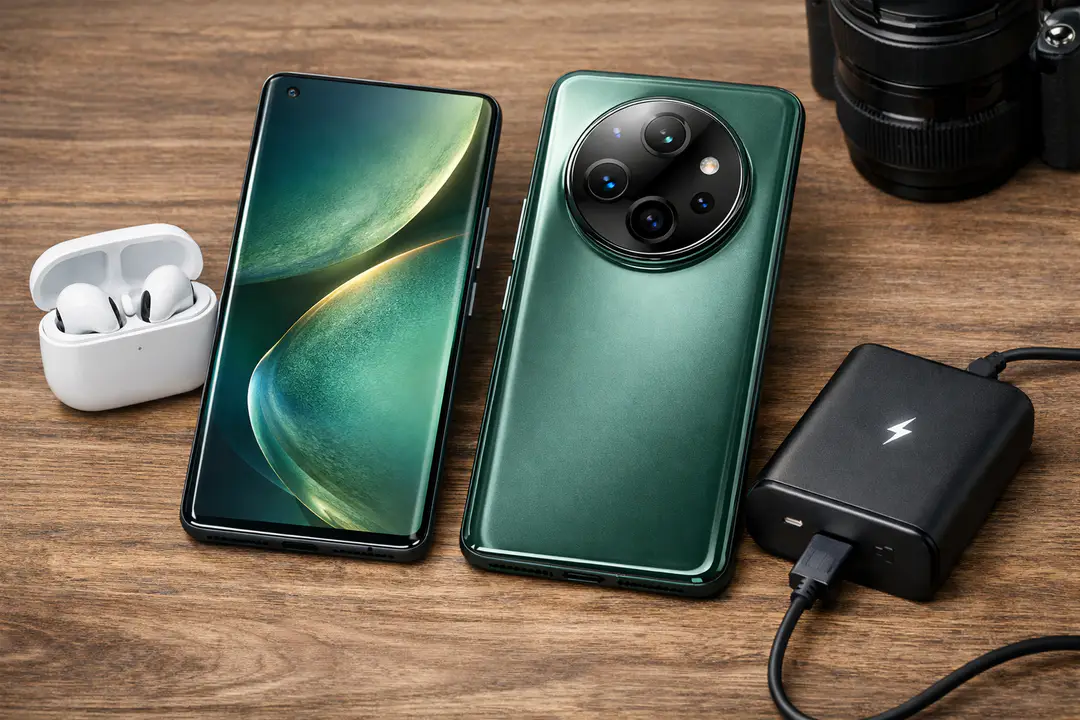
Honor Magic5 Pro Guide: Specs, Camera, Battery
The Honor Magic5 Pro is HONOR’s 2023 flagship phone, announced on February 27, 2023 and released on March 31, 2023, built around a 6.81-inch LTPO OLED display, Qualcomm’s Snapdragon 8 Gen 2, and a headline triple 50 MP rear camera system with a periscope telephoto. It also pairs a large battery (5100 mAh in global models, 5450 mAh in China) with 66W wired / 50W wireless charging, plus premium extras like IP68 water resistance and a TOF 3D sensor for face authentication.
If you’re weighing it against Samsung, Google, or other Android flagships, this phone’s appeal is straightforward: a big, bright 120 Hz refresh rate display, a versatile camera setup tuned for consistency, and day-long endurance without overly slow charging.
This guide breaks down full specifications, real-world test highlights (including GSMArena’s measured brightness), what the cameras do well (and where they don’t), plus who should buy the Magic5 Pro in 2026—especially if you’re shopping refurbished or discounted. I’ll also point out common purchasing and setup mistakes so you can avoid surprises.
What Is the Honor Magic5 Pro? (Overview)
The Honor Magic5 Pro is a premium Android 13 smartphone positioned as HONOR’s global flagship for 2023. It’s designed to compete in the same space as devices like the Galaxy S Ultra series and other top-tier camera phones, prioritizing a large, color-rich display, high-end silicon, and a versatile triple-camera array.
The core idea behind the Magic5 Pro is balance: instead of leaning on a single massive “main” camera or a single specialty zoom lens, HONOR uses three 50 MP sensors across wide, ultrawide, and telephoto. The telephoto is a periscope telephoto design to deliver meaningful reach (3.5x optical zoom) without making the phone excessively thick. Stabilization and focus tech—OIS and PDAF—are central to getting consistent shots, especially in mixed indoor lighting and at longer focal lengths.
On the performance side, the Snapdragon 8 Gen 2 (Qualcomm SM8550-AB) and Adreno 740 GPU anchor flagship-tier responsiveness. Storage matters here too: depending on the configuration/market, the device supports fast storage standards such as UFS 4.0, which helps with app installs, large video files, and long-term “snappiness.”
Why it matters: phones like this are often kept for 3–5 years. Understanding the Magic5 Pro’s strengths (display, zoom flexibility, charging options) and trade-offs (size/weight, regional battery differences, update policy expectations) is what turns a spec-sheet favorite into a satisfying daily driver.
Honor Magic5 Pro — Quick Verdict & Highlights
The Honor Magic5 Pro is best for people who want a large, premium display, dependable zoom, and long battery life, and who don’t mind a 219 g phone with a big camera module.
Who should consider it
- Travel and family photographers who want ultrawide coverage and real optical zoom (3.5x optical zoom) without carrying a separate camera.
- Power users who value smooth multitasking and gaming from the Snapdragon 8 Gen 2 and Adreno 740.
- Battery-first buyers who want strong endurance plus 66W wired / 50W wireless charging and reverse wireless charging.
Who should skip it
- One-handed minimalists: the 6.81-inch class and 219 g weight are noticeable in pockets and long sessions.
- People who need long, predictable OS support: you should verify HONOR’s current update commitments for your region and carrier before buying.
- Small-phone fans who prefer 6.1–6.4-inch devices.
Standout specs at a glance: 6.81-inch LTPO OLED with HDR10+ and 120 Hz refresh rate, Snapdragon 8 Gen 2, triple 50 MP rear cameras including a periscope telephoto, IP68, and fast charging (66W wired / 50W wireless charging).
Full Specifications (At-a-Glance Table)
Here’s a consolidated spec sheet to make comparisons easier when you’re cross-shopping. Values can vary slightly by region and configuration, so it’s smart to confirm on Honor Global (official site) and cross-check independent databases like GSMArena.
| Category | Honor Magic5 Pro |
|---|---|
| Announced / Released | Announced Feb 27, 2023 / Released Mar 31, 2023 |
| Dimensions / Weight | 162.9 x 76.7 x 8.8 mm / 219 g |
| Build / Durability | IP68 dust/water resistance |
| Display | 6.81-inch LTPO OLED, 1312 x 2848 px, 120 Hz refresh rate, HDR10+ |
| Brightness | Peak 1800 nits (spec); ~1227 nits measured in GSMArena test |
| Chipset / GPU | Qualcomm SM8550-AB Snapdragon 8 Gen 2 / Adreno 740 |
| RAM / Storage | Varies by region; includes fast storage options (UFS 4.0 on select variants) |
| Rear Cameras | 50 MP wide (large 1/1.12″ sensor) + 50 MP ultrawide + 50 MP periscope telephoto (3.5x optical zoom); OIS, PDAF |
| Video | Up to 4K video; supports 10-bit video modes (region/app dependent) |
| Front / Biometrics | Front camera with TOF 3D sensor for secure face unlock; fingerprint (in-display) |
| Battery | 5100 mAh (global) / 5450 mAh (China) |
| Charging | 66W wired / 50W wireless charging; reverse wireless charging |
| Software | MagicOS on Android 13 (at launch) |
Design, Build and Durability
The Magic5 Pro feels like a modern flagship: curved glass, a prominent circular camera island, and a size that’s clearly designed around its 6.81-inch display and large battery.
Key physical specs
- Dimensions: 162.9 x 76.7 x 8.8 mm
- Weight: 219 g
- Durability: IP68 dust/water resistance
In practice, the 219 g weight is the first thing you notice. It’s not “too heavy,” but it shifts how you use the phone: one-handed typing is less comfortable, and a case plus MagSafe-style ring (if you add one) can push it into “two-hand phone” territory. If you’re coming from a smaller device, factor in a week of adjustment.
On the plus side, the IP68 rating is meaningful for real life. It’s peace of mind for rain, spills, and the kind of countertop splashes that end phones with weaker sealing. Still, IP68 is not a free pass for saltwater or pool time—seals degrade, and liquid damage is rarely treated kindly by warranty policies.
Practical tips for daily handling
- Use a grippy case if you commute: curved glass + large size is a drop risk on trains and sidewalks.
- Consider a thinner case if pocket comfort matters; the camera bump already adds bulk.
- Clean around the camera ring: dust can build at the edges and affect how stable the phone feels on a desk.
Common mistake: judging comfort in the first 30 seconds at a store. With wide, curved devices, comfort is about extended use—scrolling in bed, filming a child’s recital, or holding it for navigation for an hour.
Display — LTPO OLED, 120 Hz and Real Brightness
The Magic5 Pro’s display is one of its strongest day-to-day features: large, smooth, and readable outdoors, with LTPO OLED efficiency that helps battery life.
Display specs that matter
- Panel: LTPO OLED
- Size: 6.81 inches
- Resolution: 1312 x 2848 px
- Refresh: 120 Hz refresh rate (adaptive via LTPO)
- HDR: HDR10+
- Brightness: 1800 nits claimed peak; ~1227 nits measured in GSMArena testing
LTPO matters because it allows the screen to dynamically adjust refresh rate based on what you’re doing. When you’re reading static text, the refresh rate can drop to save power; when you’re scrolling social feeds or gaming, it ramps up for smoothness. This is one of those “invisible” upgrades that you mostly notice in battery graphs rather than in a single wow moment.
Brightness is where marketing and reality often differ, so it’s helpful to cite measured results. GSMArena’s testing reporting around 1227 nits measured gives you a grounded expectation: excellent outdoor readability for most conditions, even if you don’t always hit the headline peak spec.
How to tune it for your usage
- Prioritize adaptive brightness outdoors; manual max can look good but can heat the phone and drain battery faster.
- Use 120 Hz if you’re sensitive to motion blur; if you want maximum endurance, try a fixed lower refresh option (if available in your MagicOS build).
- HDR10+ streaming looks best at moderate brightness in a dim room; blasting brightness can wash out perceived contrast.
Common mistake: assuming “peak nits” equals everyday brightness. Peak numbers often apply only to small HDR highlights, not full-screen sustained brightness. For real outdoor use, measured sustained performance matters more.
Performance: Snapdragon 8 Gen 2, UFS 4.0 and Benchmarks
The Magic5 Pro delivers flagship performance thanks to the Snapdragon 8 Gen 2, and it feels fast in real apps because storage speed and thermal behavior are just as important as raw CPU power.
Core performance hardware
- SoC: Qualcomm SM8550-AB Snapdragon 8 Gen 2
- GPU: Adreno 740
- Storage: configurations may include UFS 4.0 (region/variant dependent)
For everyday use—camera launches, app switching, navigation plus streaming—this hardware is comfortably over the “fast enough” line. Where you’ll feel the advantage is sustained smoothness when the phone is busy: uploading photos while you edit a clip, running a Bluetooth headset, and keeping maps active. UFS 4.0 (when present) is the quiet hero: faster reads/writes reduce app load times and help with large 4K video files.
Real-world testing notes (what to look for)
- GeekBench scores: use them to compare CPU capability across phones, but don’t overvalue small differences between Snapdragon 8 Gen 2 devices.
- GPU stability: in long sessions, look for consistent frame pacing rather than peak FPS.
- Thermals: heavy camera + 4K video + mobile data is a common “heat stack” that exposes weaker thermal designs.
A helpful way to think about benchmarks: they’re a proxy for headroom. If you mainly use messaging, email, and photos, you won’t “need” this performance. But if you keep phones longer, that headroom delays the point where new OS versions and heavier apps make a device feel old.
Common mistake: buying a high-spec phone and then leaving it in power-saving mode full-time. That often throttles background sync, reduces refresh rate behavior, and can create a worse experience than necessary. Instead, set app-specific restrictions (for social apps that drain battery) and keep normal performance for everything else.
Camera System: Three 50 MP Sensors and Periscope Telephoto
The Magic5 Pro’s camera strategy is versatility: three 50 MP cameras, strong stabilization, and a periscope telephoto that makes portraits and travel shots more consistent.
Camera hardware overview
- Main: 50 MP wide with a large 1/1.12″ sensor, PDAF, OIS
- Ultrawide: 50 MP with ultrawide 122° field of view
- Telephoto: 50 MP periscope telephoto with PDAF, OIS, 3.5x optical zoom
- Depth / Face unlock: TOF 3D sensor (front system)
The 1/1.12″ main sensor size is a big deal for low-light and indoor photography because larger sensors capture more light, reducing the need for aggressive noise reduction. Pair that with OIS and you get a better chance of sharp shots of kids, pets, or friends in restaurants.
How the three cameras work in practice
Main camera: This is your default for people, food, and general scenes. The best results come from steady framing and letting HDR do its thing. If you see faces getting slightly too smoothed, check whether any beauty or “AI” enhancements are on in MagicOS camera settings.
Ultrawide 122°: Great for travel architecture, group photos, and tight indoor spaces. The common pitfall is edge distortion—keep people closer to the center. For landscapes, ultrawide can look stunning, but watch for over-sharpening in foliage when light is harsh.
3.5x periscope telephoto: This is where the Magic5 Pro separates itself from phones with weak “2x” tele modules. For portraits, 3.5x gives a flattering perspective and helps the background fall away naturally. For travel, it’s ideal for details on buildings, signs, and candid street scenes where you can’t get close.
Photo examples (typical scenarios)
- Indoor birthday party: main camera + OIS helps keep faces sharper; avoid switching to telephoto if the room is very dim unless the phone maintains shutter speed.
- City trip: ultrawide for cathedrals; 3.5x optical zoom for sculptures and rooftops.
- Pet photo: use burst/continuous shooting; telephoto can help avoid scaring pets by getting closer.
For third-party context, DXOMARK’s scoring and methodology can be a useful reference point for consistency, dynamic range, and zoom behavior, while outlets like AndroidPolice often highlight usability details (shutter lag, processing style, and video stability) that aren’t obvious from specs alone.
Common mistake: assuming 50 MP means you should always shoot at full resolution. In many conditions, default pixel-binned modes produce better dynamic range and lower noise. Use high-res modes mainly for bright daylight scenes where you plan to crop.
Video: 4K, 10-bit Footage, and Stabilization Tips
The Magic5 Pro is a capable video phone for families, creators, and travelers, with 4K video options and support for 10-bit video in certain modes, but technique still matters for the best results.
Video capabilities to know
- Resolution: Up to 4K video
- Color: 10-bit video (mode/app dependent)
- Stabilization: OIS on key modules; electronic stabilization depending on mode
For most people, the main camera will deliver the best mix of detail and stability. The periscope telephoto can look excellent for daylight clips and stage performances, but in low light you may see more noise and less stable exposure. If you’re filming kids running around indoors, it’s often better to stay on the main camera and move your feet rather than zooming.
Practical shooting settings (that actually help)
- Use 4K for travel and family archives where you’ll crop later; use 1080p for quick sharing and smaller storage impact.
- Lock exposure when needed for scenes with bright windows; it prevents the “pumping” look.
- Stabilize with your body: keep elbows tucked, use two hands, and walk heel-to-toe for smoother motion.
If you want the most consistent look, avoid rapidly switching lenses mid-clip. Multi-camera color matching has improved across the industry, but it’s still common to see a shift in white balance or contrast when jumping from ultrawide to main to telephoto.
Common mistake: overusing 10-bit/HDR modes without a plan. They can look great, but editing and sharing pipelines vary. If your workflow is “shoot and post,” test a short clip first to ensure your social apps and TV playback handle it properly.
Battery Life and Charging (5100 mAh / 5450 mAh — Regional Differences)
The Magic5 Pro’s endurance is one of its most practical strengths, but you need to know which battery size your region gets and what charging equipment is required to hit peak speeds.
Battery and charging specs
- Battery: 5100 mAh (global) / 5450 mAh (China)
- Charging: 66W wired / 50W wireless charging
- Extras: reverse wireless charging
The regional battery split matters when you read reviews. A China model with 5450 mAh can show noticeably stronger endurance than the 5100 mAh global model, especially for heavy users on mobile data. When comparing endurance rating figures across sites, make sure the tested unit matches the model you can buy.
What to expect in real life
- Mixed use (Wi‑Fi + some 5G): typically a full day for most users, often with comfortable headroom.
- Camera-heavy days: still solid, but long 4K video and lots of zoom shooting will drain faster than social and messaging.
- Gaming sessions: Snapdragon 8 Gen 2 is efficient, but high brightness + 120 Hz will be the bigger battery driver.
To get the best charging speeds, use a compatible charger and cable. Many buyers assume any “65W” USB-C brick will behave the same, but proprietary charging profiles can affect peak rates. Wireless charging at up to 50W is convenient for desk drops, and reverse wireless charging is genuinely useful for topping up earbuds or a friend’s phone in a pinch.
Common mistake: leaving the phone on a high-power wireless charger all day. Heat is the long-term enemy of battery health. If you’re using wireless as a desk charger, consider a slower pad for daytime trickle and reserve fast wireless for short top-ups.
Connectivity, Sensors and Extras (IP68, TOF 3D, Audio)
The Magic5 Pro rounds out the flagship checklist with modern connectivity, robust sensors, and security features, including a TOF 3D system that’s still relatively rare on Android phones.
Notable hardware extras
- IP68 water and dust resistance for everyday resilience
- TOF 3D sensor enabling more secure face authentication
- Biometrics: face unlock (3D) plus in-display fingerprint
In daily use, the TOF 3D setup is one of those features you appreciate most when conditions are bad: dark rooms, bright backlight, or when you’re wearing glasses. It tends to be more reliable than basic 2D face unlock implementations that rely heavily on the selfie camera alone.
For travelers, durability and authentication are bigger “quality of life” factors than people expect. IP68 helps reduce stress when you’re using the phone for maps in the rain, and reliable biometrics matters when you’re tapping into banking apps on the move.
It’s also worth considering how tech trends like cloud services influence phone usage. The more you stream and sync, the more your experience depends on network stability and platform behavior. If you’re curious how broader infrastructure shapes modern devices, keep an eye on how cloud adoption patterns are changing what we expect from mobile hardware and services.
Common mistake: ignoring region band support and carrier compatibility when buying imported models. Saving money on a gray import can backfire if you lose key LTE/5G bands or local warranty coverage.
Software, Updates and MagicOS (Android 13 at Launch)
The Magic5 Pro launched with Android 13 and HONOR’s MagicOS overlay, which focuses on visual polish, multitasking features, and ecosystem integration.
What MagicOS changes (and why it matters)
- UI and features: HONOR’s design language, added tools, and system apps
- Battery management: aggressive background controls are common on many Android skins
- Camera processing: HDR behavior, skin tones, and sharpening are influenced by software tuning
MagicOS is generally fast on Snapdragon 8 Gen 2 hardware, but the key variable is update cadence and regional policy. If you’re buying the phone today, ask two questions: what Android version is it currently on, and how many major OS updates/security patches does your specific model typically receive? Manufacturer promises can differ by country and retailer channel.
Also, understand the “defaults.” Many phones ship with battery optimization that can delay notifications for less-used apps. If you rely on time-sensitive alerts (work chat, delivery apps, smart home), you may need to whitelist a few apps in battery settings and allow background activity. This is a common source of confusion for people who switch brands.
For context on how quickly mobile software expectations change, it can help to follow broader technology trend coverage—even outside phones—because consumer devices increasingly share the same themes: long-term support, security, and seamless connectivity.
Common mistake: restoring a full backup from a different brand and assuming everything will behave the same. After setup, spend 15 minutes checking notification permissions, default browser/password manager, and camera app settings.
Price, Variants and Where to Buy
In 2026, the Honor Magic5 Pro is often most attractive as a discounted new unit, refurbished flagship, or lightly used phone—especially if you want Snapdragon 8 Gen 2 performance without paying current-gen flagship pricing.
How to shop smart
- Confirm the exact variant: RAM/storage, dual SIM behavior, and whether UFS 4.0 is part of your configuration.
- Check battery size by region: 5100 mAh (global) / 5450 mAh (China) can affect expectations.
- Verify charger inclusion: some markets include the fast charger; others don’t.
- Prioritize warranty: especially for water resistance and display issues.
For official information and local availability, start with Honor Global (official site). For spec verification and standardized testing references, GSMArena is a practical cross-check. And if you’re camera-focused, DXOMARK can provide structured comparisons (even if you don’t agree with every weighting choice).
Refurbished buying tip: request a battery health reading if the seller can provide it, and inspect the USB-C port and camera lens coatings. Charging performance and flare resistance can degrade if a device was used heavily without care.
Common mistake: comparing prices without factoring accessories you’ll need to match the phone’s capabilities. If you want 50W wireless charging, you may need a compatible stand/pad. If your unit doesn’t ship with the fast wired brick, add that cost to your decision.
Practical Tips and Best Practices
To get the most from the Honor Magic5 Pro, focus on settings that improve daily experience rather than chasing maximum specs all the time.
- Optimize the camera before a trip: test main vs ultrawide vs periscope telephoto in your common lighting (indoors, sunset, streetlights). Small tweaks—like disabling excessive smoothing—make a big difference in people shots.
- Set up charging intentionally: use 66W wired / 50W wireless charging for fast top-ups, but avoid sustained heat. If you work at a desk, a slower charger can be kinder to the battery long-term.
- Use the right zoom at the right time: 3.5x optical zoom is excellent for portraits and daylight detail. In very low light, prefer the main camera and crop if needed for cleaner results.
- Control notifications instead of blanket battery saver: in MagicOS, whitelist time-sensitive apps and leave the phone in normal mode for smoother performance.
- Protect the size/curves: a case with good corner protection is worth it. Curved displays are more vulnerable to edge impacts, and repairs can erase any “deal” you got on purchase price.
Also consider how your broader digital life affects phone satisfaction. If you rely heavily on online accounts, backups, and cross-device access, it’s worth keeping your security hygiene sharp and understanding account recovery flows. Even outside Android, learning how services like cloud account management works can save hours when you switch devices or recover data.
Things to avoid: cheap uncertified chargers, unknown marketplace “fast” wireless pads, and importing a variant without confirming your carrier bands. These are the most common sources of disappointing performance and unreliable connectivity.
FAQ
Is the Honor Magic5 Pro still worth buying in 2026?
Yes if you can find it at a good price and you’re comfortable with its size. Snapdragon 8 Gen 2 performance remains strong for everyday use and gaming, and the triple 50 MP camera system with periscope telephoto still covers a wide range of shooting needs. Confirm current software version and update support for your region before you buy.
Does the Magic5 Pro really hit 1800 nits brightness?
The 1800 nits figure is a claimed peak value typically associated with HDR highlights. In independent testing, GSMArena measured around 1227 nits, which is still excellent for outdoor readability. What matters most is sustained brightness in sunlight, and the Magic5 Pro performs well there.
What’s the difference between the 5100 mAh and 5450 mAh models?
Global models generally use a 5100 mAh battery, while China models are listed at 5450 mAh (China). The larger battery can translate into extra screen-on time, especially on mobile data. When reading endurance rating results, verify which model was tested so you’re not comparing mismatched units.
How good is the periscope telephoto for portraits and travel?
With 3.5x optical zoom plus OIS and PDAF, the periscope telephoto is well-suited for portraits (flattering perspective) and travel details (architecture, signs, distant subjects). It’s strongest in good light. In very dim scenes, the main camera may produce cleaner results with less noise.
Does it support fast wireless charging and reverse charging?
Yes, it supports 66W wired / 50W wireless charging (with compatible equipment), and reverse wireless charging for topping up accessories like earbuds. Keep in mind that wireless fast charging can generate more heat, so it’s best used for quick boosts rather than all-day charging.
Conclusion
The Honor Magic5 Pro is a thoughtfully balanced flagship: a large 6.81-inch LTPO OLED with 120 Hz refresh rate and HDR10+, Snapdragon 8 Gen 2 performance with fast storage options like UFS 4.0 (variant dependent), and a versatile camera system built around three 50 MP sensors—including a genuinely useful periscope telephoto with 3.5x optical zoom, OIS, and PDAF. Add IP68, TOF 3D face authentication, and 66W wired / 50W wireless charging, and it still checks a lot of premium boxes.
The key is buying it wisely. Confirm your region’s battery size (5100 mAh global vs 5450 mAh China), verify update expectations for your exact model, and budget for the right charging accessories if they’re not in the box. If those pieces line up, the Magic5 Pro remains a strong option for shoppers who want flagship-level camera flexibility and endurance without chasing the newest release.