

How to Build an AI Agent: A Practical 15-step Guide
To build an AI agent, create a system that can interpret a goal, choose an action, use external tools, observe the result, and continue until it reaches a useful outcome. Start with a narrow workflow and measurable success criteria. Accuracy, response time, data access, and permission limits will guide your choice of model, tools, and framework.
Build an AI Agent in 15 Steps
-
Define one workflow and its desired outcome before selecting technology.
-
Select a development environment, such as Python 3.10+, Ollama for local model testing, or a no-code builder.
-
Choose a language model that meets the required accuracy, latency, privacy, and cost targets.
-
Establish a performance baseline with the most capable practical model, then test smaller models against it.
-
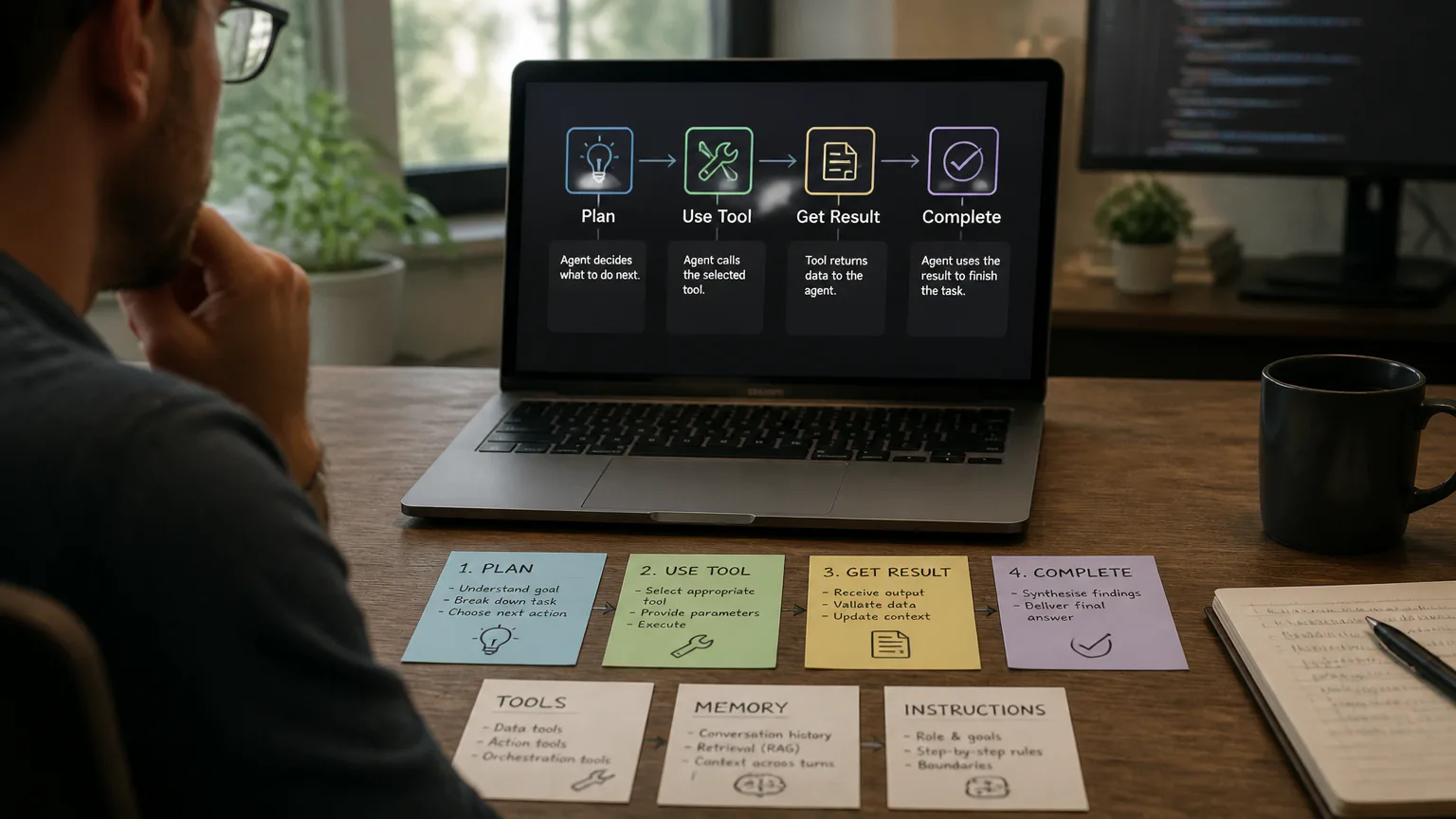
Add the three foundational components: a model, tools, and explicit instructions.
-
Categorize tools as data tools, action tools, or orchestration tools.
-
Create the agent loop that reads input, selects an action, executes it, observes the result, and repeats.
-
Define every tool with a structured name, description, parameters, validation rules, and expected output.
-
Store conversation history so the agent retains relevant context across turns.
-
Connect approved APIs, databases, documents, web search, calendars, CRMs, or computer-use interfaces through controlled integrations.
-
Add retrieval memory with embeddings and retrieval-augmented generation when the agent needs relevant information from a document collection.
-
Write instructions that divide work into smaller actions and define edge cases, stopping conditions, and escalation behavior.
-
Test realistic scenarios with evaluations for accuracy, tool selection, incomplete data, and failure recovery.
-
Secure sensitive operations with approvals, guardrails, least-privilege permissions, prompt-injection defenses, and human handoffs.
-
Deploy the agent in a cloud or application environment, then monitor cost, latency, errors, and tool behavior.
Choose a workflow worth automating
An AI agent suits workflows that involve unstructured information, changing conditions, or decisions that are difficult to maintain as fixed rules. Sending the same report every Monday is usually ordinary automation. Reviewing an inbox, identifying relevant issues, checking a customer record, drafting a response, and requesting approval is a better use of an agent.
-
Define the input: Identify the message, document, event, or request that starts the workflow.
-
Define the output: Specify the result, such as a ticket, recommendation, draft, database update, or approved transaction.
-
Define success: Set measurable targets for accuracy, completion rate, response time, and cost per task.
-
Define boundaries: List the actions the agent can take automatically and those that require human approval.
Start with one workflow and one outcome. A narrowly scoped calendar assistant, support-ticket triage agent, or document-search agent is easier to evaluate than a general workplace assistant with unrestricted access.
Pick no-code or Python
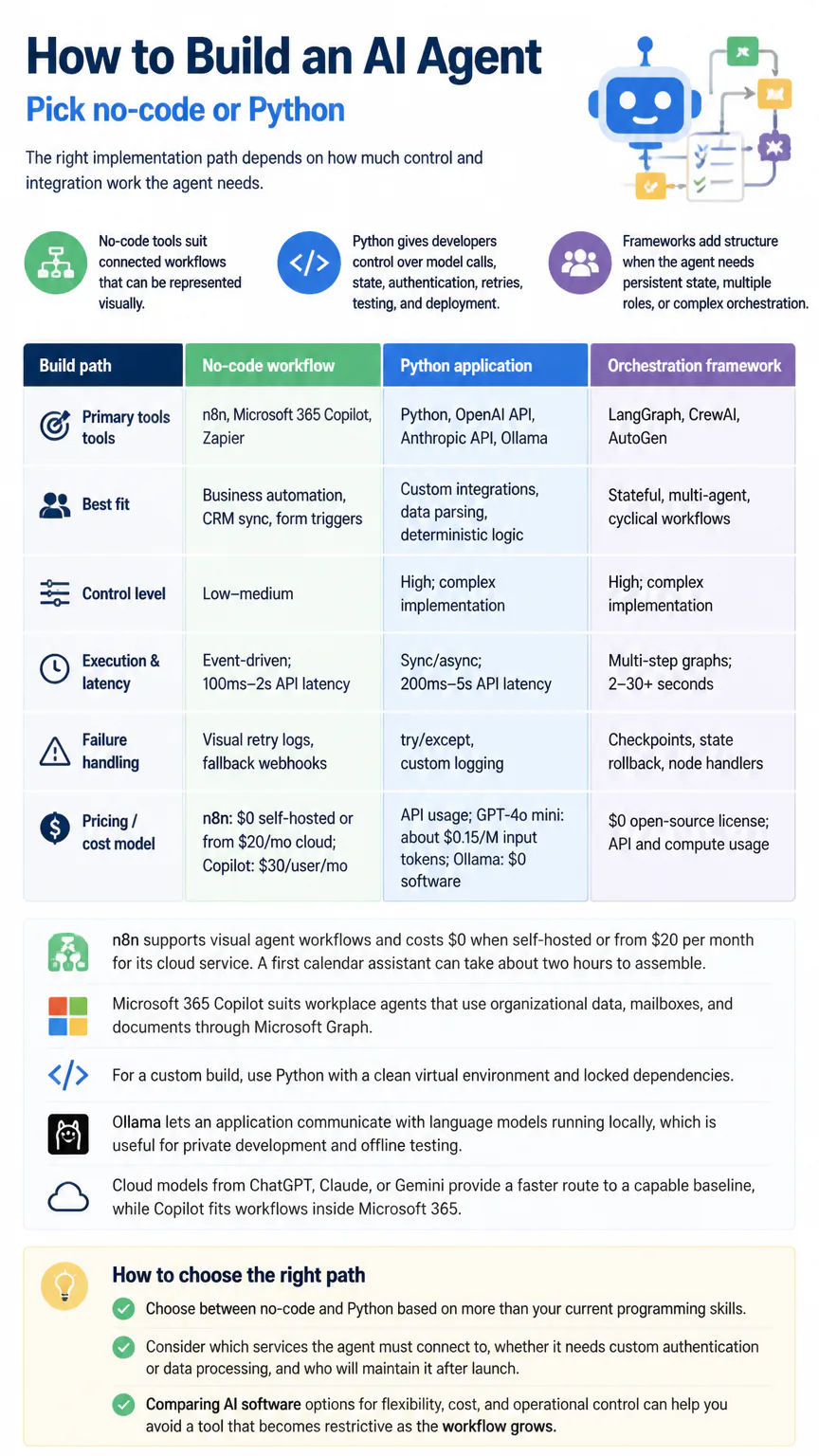
The right implementation path depends on how much control and integration work the agent needs. No-code tools suit connected workflows that can be represented visually. Python gives developers control over model calls, state, authentication, retries, testing, and deployment. Frameworks add structure when the agent needs persistent state, multiple roles, or complex orchestration.
|
Build path |
Primary tools |
Best fit |
Control level |
Execution & latency |
Failure handling |
Pricing / cost model |
|---|---|---|---|---|---|---|
|
No-code workflow |
n8n, Microsoft 365 Copilot, Zapier |
Business automation, CRM sync, form triggers |
Low–medium |
Event-driven; 100ms–2s API latency |
Visual retry logs, fallback webhooks |
n8n: $0 self-hosted or from $20/mo cloud; Copilot: $30/user/mo |
|
Python application |
Python, OpenAI API, Anthropic API, Ollama |
Custom integrations, data parsing, deterministic logic |
High; complex implementation |
Sync/async; 200ms–5s API latency |
try/except, custom logging |
API usage; GPT-4o mini: about $0.15/M input tokens; Ollama: $0 software |
|
Orchestration framework |
LangGraph, CrewAI, AutoGen |
Stateful, multi-agent, cyclical workflows |
High; complex implementation |
Multi-step graphs; 2–30+ seconds |
Checkpoints, state rollback, node handlers |
$0 open-source license; API and compute usage |
n8n supports visual agent workflows and costs $0 when self-hosted or from $20 per month for its cloud service. A first calendar assistant can take about two hours to assemble. Microsoft 365 Copilot suits workplace agents that use organizational data, mailboxes, and documents through Microsoft Graph.
For a custom build, use Python with a clean virtual environment and locked dependencies. Ollama lets an application communicate with language models running locally, which is useful for private development and offline testing. Cloud models from ChatGPT, Claude, or Gemini provide a faster route to a capable baseline, while Copilot fits workflows inside Microsoft 365.
Choose between no-code and Python based on more than your current programming skills. Consider which services the agent must connect to, whether it needs custom authentication or data processing, and who will maintain it after launch. Comparing AI software options for flexibility, cost, and operational control can help you avoid a tool that becomes restrictive as the workflow grows.
Assemble the agent architecture
An AI agent combines a language model with instructions, tools, state, and an execution loop. The model proposes the next action, while the surrounding application validates that action, runs the tool, records the result, and decides whether another model call is needed. Keeping these responsibilities separate prevents the model from receiving unrestricted control over external systems.
-
Model: Interprets requests, reasons about available choices, selects tools, and produces responses.
-
Instructions: Define the agent’s role, operating rules, output format, limits, and escalation conditions.
-
Tools: Retrieve data or perform actions through typed functions and authenticated APIs.
-
Agent loop: Repeats the sequence of input, decision, action, observation, and stopping condition.
-
Conversation state: Preserves relevant messages, tool results, user preferences, and workflow status.
-
Retrieval memory: Finds relevant passages from documents or databases using embeddings and RAG.
-
Orchestration: Coordinates branches, retries, approvals, handoffs, and multiple specialized agents.
-
Safety layer: Checks inputs, outputs, permissions, sensitive data, and high-impact actions.
OpenAI Agents SDK supports agent definitions, tools, orchestration, handoffs, and input and output guardrails. LangGraph suits stateful graphs with cyclic workflows, recovery paths, and human-in-the-loop checkpoints. Add these layers gradually. A first agent usually does not need multi-agent coordination or long-term memory.
Write instructions that reduce errors
Write instructions as an operating procedure rather than a broad personality prompt. State what information the agent must collect, which tool it should use in each situation, how it should format results, and when it must stop. Include responses for missing records, conflicting data, unavailable tools, and requests outside the approved scope.
-
State the objective: Describe the result the agent must produce.
-
Specify the sequence: Break complex work into smaller actions with clear dependencies.
-
Define evidence: Require the agent to distinguish retrieved facts from assumptions.
-
Set output rules: Require structured fields, valid formats, and concise explanations.
-
Handle uncertainty: Tell the agent to ask for missing information or escalate instead of inventing an answer.
-
Set stopping conditions: Limit retries, tool calls, execution time, and actions after failed validation.
Keep business rules in application code when they are exact, sensitive, or legally significant. The model can interpret a request, but deterministic code should validate amounts, account ownership, required fields, and authorization before an irreversible action runs.
Connect tools and external data
Tools let an agent do more than generate text. A data tool reads from a database or document index, an action tool changes an external system, and an orchestration tool controls workflow state or approval. Each tool needs authentication, input validation, logging, and a predictable response format.
-
Choose one narrowly scoped integration, such as a calendar, CRM, database, document store, or web search service.
-
Define the function name, parameter types, required fields, permissions, and expected response.
-
Validate arguments before sending them to the external service.
-
Execute the request with short timeouts, bounded retries, and an authenticated service account.
-
Return a structured result that identifies success, failure, missing data, and any next action.
-
Record the request, result, latency, user, and authorization decision without storing unnecessary sensitive content.
A weather function might be named get_weather and accept a required location argument. The Model Context Protocol can expose local databases, enterprise files, or APIs through a JSON-RPC server. Compatible applications can then access approved context through a standardized interface.
Coordinate multiple agents carefully
Multi-agent design makes sense when separate roles have genuinely different instructions, tools, or review responsibilities. It also increases model calls, latency, debugging effort, and permission complexity. Build and evaluate a single-agent workflow first, then split it only when separate roles improve the result.
-
CrewAI: Coordinates role-based autonomous teams with sequential or hierarchical task delegation.
-
AutoGen: Supports conversational collaboration between agents for brainstorming, code review, and complex problem-solving.
-
LangGraph: Controls state transitions, cycles, recovery paths, and approval checkpoints across a workflow.
-
OpenAI Agents SDK: Supports handoffs between specialized agents with safety guardrails around inputs and outputs.
Give each agent a narrow role and a limited tool set. Decide which agent owns the final answer, how disagreements are resolved, and when a human must review the work. Several agents should not independently perform the same sensitive action without a central authorization check.
Test safety and reliability
An agent that works in a clean demonstration can still fail on incomplete records, ambiguous requests, malicious instructions, expired credentials, or unavailable services. Test the complete workflow, including its tools and permissions. Store representative test cases and rerun them after changing the model, prompt, retrieval index, or application code.
-
Test accuracy: Compare answers and actions with expected results across normal and edge-case requests.
-
Test tool selection: Check that the agent chooses the correct tool and supplies valid arguments.
-
Test prompt injection: Place hostile instructions in user messages, documents, web pages, and tool results.
-
Test permissions: Confirm that each identity can access only the records and actions assigned to it.
-
Test failure recovery: Simulate timeouts, malformed responses, duplicate events, and revoked credentials.
-
Test escalation: Verify that sensitive or uncertain cases reach a human before execution.
Use least-privilege service accounts and separate read access from write access. Add approval gates for payments, account changes, external messages, deletions, and other irreversible actions. Common production limitations include hallucinations, permission risks, high latency, and repeated model-call costs.
Reliability testing should cover the systems behind an agent, not just the quality of its outputs. Check where prompts and retrieved data go, which vendors can access them, how long they keep them, and whether the agent can trigger sensitive actions without approval. This broader threat model helps teams identify stealth provider risks before deploying an otherwise well-tested agent.
Deploy and improve the agent
Deploy the agent after it meets its accuracy and safety targets in a controlled environment. Package the application and dependencies in a repeatable build, store secrets outside the codebase, and expose only the endpoint or interface the workflow requires. Containerization helps keep local tests and production dependencies consistent.
-
Package the agent and its locked dependencies in a repeatable application build.
-
Configure secrets, model settings, rate limits, queues, and environment-specific permissions.
-
Deploy the service on a cloud platform or inside the application environment that owns the workflow.
-
Monitor latency, model calls, token usage, tool errors, failed tasks, approvals, and user corrections.
-
Review traces and evaluation results to identify prompt, retrieval, model, or integration failures.
-
Optimize cost and speed by shortening context, caching safe results, reducing unnecessary tool calls, and testing smaller models.
Keep a capable model as the quality baseline while evaluating substitutions. A simple rule-based agent costs $10,000 to $30,000 to develop, a model-based reflex agent costs $40,000 to $80,000, and advanced learning or multi-agent systems cost $100,000 to $400,000 or more. Security and privacy hardening adds an estimated $13,500 to $24,300.
Build an agent with ChatGPT
ChatGPT can help beginners create a configured custom GPT or hosted agent experience. Instructions and approved capabilities are set through a visual interface, making this route suitable for a contained personal or workplace workflow that does not need a separately managed application.
A developer-built API agent uses ChatGPT as the model while the application controls instructions, state, tool definitions, authentication, testing, and deployment. External actions still need approved tools, valid authentication, and tests for permissions, failures, and unintended requests. The visual experience and API build therefore suit different levels of control.

Build an agent with Claude
Claude can act as the model in a custom agent workflow. The surrounding application supplies instructions, structured tool definitions, conversation state, permissions, and evaluations. Application code validates each tool call before an external action runs and can stop the workflow when data is missing or a request falls outside its scope.
A Claude subscription provides access to the service for its intended user experience. It is separate from API usage, hosting, external tools, data storage, monitoring, and security costs in a production application. Those additional components must be planned when Claude is part of a larger agent system.
Build an agent with Gemini
To build with Gemini, select Gemini as the model and connect approved tools through an application or compatible orchestration layer. Define structured inputs and outputs so the application can validate each request and result before the workflow continues.
Test Gemini tool calls, permissions, latency, and cost within the complete workflow. Choosing Gemini as the model does not remove the need for application-level state, authentication, failure handling, and deployment controls. The surrounding application remains responsible for limiting access and handling unsafe or incomplete requests.
When you build an agent with Gemini, look beyond how fluently it answers. Reliable performance in a real workflow depends on tool calling, context handling, grounding, latency, and how the agent responds to ambiguous instructions. Understanding Gemini’s groundbreaking capabilities can help you weigh these factors during the design process.
How long does it take?
A no-code proof of concept can take about two hours when the workflow uses existing connectors and has a small scope. A Python prototype takes longer because it requires application code, authentication, tool definitions, testing, and deployment. Production timing depends on data quality, approval requirements, integration count, and the consequences of failure.
-
Proof of concept: One workflow, one model, and one or two tools.
-
Working internal application: Persistent state, authentication, evaluation cases, logging, and failure handling.
-
Production system: Permission design, privacy controls, monitoring, human approvals, deployment automation, and ongoing evaluation.
Do not measure completion by whether the model produces a convincing response. The useful milestone is a repeatable workflow that reaches the correct outcome, records what happened, and stops safely when it cannot proceed.
Community discussions
Community discussions can offer implementation ideas, troubleshooting tips, and candid accounts of framework limitations. Common topics include Python, n8n, LangGraph, CrewAI, AutoGen, and the OpenAI Agents SDK, particularly when a specific integration is not covered by a basic example.
Issue trackers and project discussions can also help with changed package interfaces, authentication errors, tool-calling behavior, and deployment configuration. Treat recommendations as starting points. Check release notes, pricing, permissions, and API behavior before using them in an agent, and avoid code that exposes secrets or grants broader access than the workflow requires.
FAQs
Can you build an AI agent without coding?
Yes. n8n supports visual workflows, and Microsoft 365 Copilot supports creating, configuring, testing, and sharing workplace agents. Coding becomes necessary when the agent needs custom state management, unusual integrations, specialized security controls, or application-specific behavior.
How is an AI agent different from a chatbot?
A chatbot primarily generates responses to a conversation. An AI agent can plan a sequence, call external tools, observe results, update its state, and take approved actions toward a defined outcome.
What Python skills are needed?
Start with functions, classes, virtual environments, exceptions, JSON, HTTP requests, authentication, and asynchronous programming. You also need enough testing and logging knowledge to validate tool calls and diagnose failures.
Can an AI agent be built for free?
Yes, a small prototype can use a free n8n tier or a local model served through Ollama. Cloud model calls, hosted databases, private deployment, monitoring, and security controls create ongoing costs as the agent becomes more capable.
How much does Claude Pro cost?
Claude Pro costs $20 per month, while Claude Max costs $100 per month. Those subscriptions do not represent the full cost of an application that uses APIs, external tools, hosting, data storage, monitoring, and security hardening.

Conclusion
Build the smallest agent that can complete one measurable workflow, then add tools, memory, orchestration, and autonomy only when testing shows they are needed. Start with a capable model, enforce permissions in application code, and treat monitoring and human approval as part of the product.