

How to Self-Host Bluesky PDS: Setup, DNS, TLS, and Troubleshooting
Yes, you can self host Bluesky by running your own Bluesky PDS, which is a Personal Data Server (PDS) on the AT Protocol network. That gives you control over your account data, signing keys, handle setup, and server operations, but it also makes you responsible for DNS, TLS, SMTP, updates, backups, and uptime.
For most people, the practical goal is not to build a full alternative to the Bluesky social network. It is to host your own account on a PDS that still connects to the wider network through a relay and remains visible in an AppView. That is the part self-hosters need to understand before they start.
What self-hosting Bluesky means
A Personal Data Server stores your hosted data, keeps your account online, and holds the keys used to sign activity. In atproto terms, your account identity is tied to a DID, while your public-facing handle can point to a domain you control.
Self-hosting a PDS does not mean you also run every other network component. Discovery and presentation still depend on broader infrastructure such as a relay, which ingests events from your server over WebSockets, and an AppView, which renders network content for clients.
Before you start
The current self-hosting path is best for technical users who are comfortable with Linux, containers, DNS changes, and reverse proxy behavior. The official setup is designed around a fresh VPS rather than an existing shared server stack.
-
Public IPv4 address
-
Public DNS name
-
Inbound access on 80/tcp and 443/tcp
-
Ubuntu 24.04 or a comparable Debian-based environment
-
1 GB RAM, 1 CPU core, and 20 GB SSD for roughly 1 to 20 users
-
amd64 or arm64 architecture
-
An SMTP provider for email delivery
A common low-cost starting point is a VPS on DigitalOcean or Vultr. One practical example uses a 1 GB RAM, 1 CPU, 25 GB SSD DigitalOcean Droplet at $6 per month, which aligns well with the documented baseline for a small PDS.
Network limits
Bluesky federation is open enough for self-hosted PDS instances to join the network directly, and the earlier Discord registration requirement was removed in May 2024. Support is still available through the PDS Admins Discord, which remains useful because the software updates frequently and operational issues are often specific to self-hosted environments.
There are still practical constraints. Early-access federation guidance set limits of 10 accounts per PDS, 1,500 events per hour, and 10,000 events per day, so this is not the right design for a large public multi-tenant instance.
Core components
PDS
The PDS is your account host. It stores repository data, manages identity-related state, and exposes the endpoints needed for account access and federation.
Relay
The relay consumes your server’s event stream. If relay connectivity breaks, your posts can exist on your PDS while failing to propagate correctly across the network firehose.
AppView
An AppView indexes and displays content for users. Running a PDS alone does not replace the AppView layer used by the main Bluesky social network experience.
Identity layer
Your handle resolves separately from your DID. That split is why custom-domain handle setup depends on DNS records and domain verification, while account identity remains anchored in the PLC directory.
Recommended deployment path
The standard route is the official containerized deployment using Docker and Docker Compose. The installer asks for a public DNS address, an admin email, and an initial user account with email and handle details.
If you already maintain mixed services on one host, pay close attention to container networking and software updates; the same operational discipline used for software updates matters here because PDS releases can change fast enough to break a stale deployment.
-
Provision a fresh VPS
-
Point DNS to the server
-
Open ports 80 and 443
-
Install Docker and Docker Compose
-
Run the Bluesky PDS installer or official compose setup
-
Configure SMTP
-
Create the first account
-
Verify health, handle, and network propagation
DNS and domain layout
You need a public DNS name for the server itself and, if you want a custom domain handle, control over the handle domain. A common layout is to host the PDS on a subdomain such as pds.example.com while using example.com as the handle.
One straightforward pattern is an A record for the root domain and another record for the PDS hostname. Some Namecheap-based setups follow that exact arrangement to separate the service endpoint from the public handle.
Custom handle verification
To use a custom domain handle, add a TXT record under _atproto that points to your account’s DID. This is the key piece of domain verification for handle ownership.
The flow often starts with a temporary handle on the service domain and then switches to the final custom handle later. A real example is an account created with a temporary handle like temp.pds.bskydemo.xyz before changing to the final domain.
Wildcard records
If you plan to let other users create accounts on your PDS, you need a wildcard DNS record. Without that, new account creation on the instance will not follow the expected host naming model.
TLS and reverse proxy choices
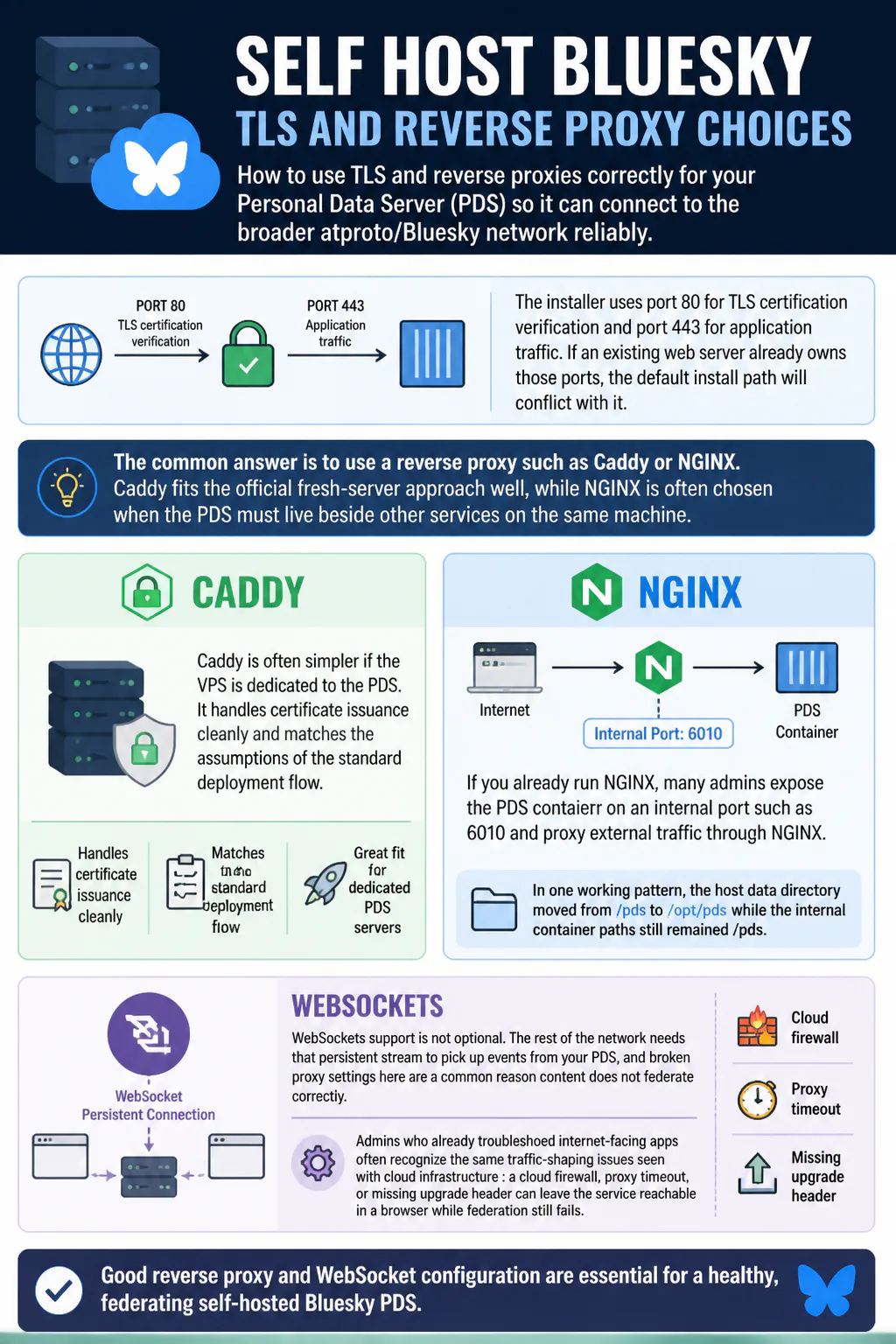
The installer uses port 80 for TLS certification verification and port 443 for application traffic. If an existing web server already owns those ports, the default install path will conflict with it.
The common answer is to use a reverse proxy such as Caddy or NGINX. Caddy fits the official fresh-server approach well, while NGINX is often chosen when the PDS must live beside other services on the same machine.
Caddy
Caddy is often simpler if the VPS is dedicated to the PDS. It handles certificate issuance cleanly and matches the assumptions of the standard deployment flow.
NGINX
If you already run NGINX, many admins expose the PDS container on an internal port such as 6010 and proxy external traffic through NGINX. In one working pattern, the host data directory moved from /pds to /opt/pds while the internal container paths still remained /pds.
WebSockets
WebSockets support is not optional. The rest of the network needs that persistent stream to pick up events from your PDS, and broken proxy settings here are a common reason content does not federate correctly.
Admins who already troubleshoot internet-facing apps often recognize the same traffic-shaping issues seen with cloud infrastructure: a cloud firewall, proxy timeout, or missing upgrade header can leave the service reachable in a browser while federation still fails.
Email and SMTP
Your PDS needs working SMTP for account-related mail. That includes confirmation and administrative email flows, so this is not a cosmetic step.
One practical setup uses Resend with an API key and a verified sending domain. However you wire it up, keep the values in your pds.env file accurate, especially the admin email and sender configuration.
-
Verified sender domain
-
Valid SMTP or provider credentials
-
Correct admin email
-
Matching DNS records for the email domain
Account creation and handles
During setup, you can create an initial account directly on your PDS. Depending on the flow, you may also need an invite code for account creation, so check the current behavior of your chosen installation method.
Once the account exists, you can change the handle after DNS verification is in place. The relevant identity operation is updateHandle, and the final public result should match both your bluesky profile and the DID-linked domain record.
How to verify the server
After installation, check the health endpoint at /xrpc/_health. A working instance returns JSON including a version string such as 0.2.2-beta.2.
You should also verify four operational outcomes, not just one. Healthy HTTP alone does not prove federation is working.
-
The health endpoint responds correctly
-
TLS certification verification succeeded
-
The account can sign in and post
-
The wider network receives updates from your PDS
Troubleshooting common failures
Handle shows invalid
If the custom domain handle appears invalid, confirm that the _atproto TXT record contains the correct DID. Then verify that your reverse proxy passes WebSockets correctly, because handle and crawl visibility issues often appear together.
In a known recovery flow, fixing WebSocket proxying and then running pdsadmin request-crawl bsky.network resolved the issue. That forces a fresh crawl request after the identity path is corrected.
Posts do not propagate
This usually points to relay visibility problems, WebSockets misconfiguration, or blocked network paths. Check reverse proxy headers, cloud firewall rules, and whether the instance is reachable on the expected public DNS name.
Ports 80 and 443 already in use
This is common on shared hosts. Either move the existing service away from those ports or front the PDS with a properly configured reverse proxy that still allows certificate validation and external HTTPS access.
Email not arriving
Review SMTP credentials, sending-domain verification, and the admin email in pds.env. If the provider requires extra DNS records, finish those before debugging the PDS itself.
Container starts but instance fails
Check mounted paths, environment values, and file permissions first. Operationally, this looks a lot like debugging a misbehaving Python software stack where the service process exists but the surrounding configuration is what actually breaks the app.
Admin tools
The PDS image includes goat CLI support and a bundled pdsadmin tool for server operations. Those are the tools to learn if you expect to manage handles, inspect status, and trigger maintenance actions without relying only on the web app.
-
goat CLI for account and protocol operations
-
pdsadmin for instance administration
-
Compose logs for container-level debugging
-
DNS inspection tools for handle verification
Backups and data safety
Self-hosting means you need backups for both data and configuration. At minimum, keep copies of your PDS data directory, environment files, and any reverse proxy configuration that is required to restore service.
Many small deployments use SQLite, which keeps the stack simpler, but that does not reduce the need for consistent backups. The value of a self-hosted account is tied directly to whether you can restore it after a bad update, disk issue, or operator mistake.
Migration and lock-in questions
The AT Protocol model supports account migration, which is one reason some users choose to self-host. In practice, migration still requires careful handling of identity, DNS, and server continuity, so it should be planned before an outage forces the issue.
If your long-term goal is ownership rather than experimentation, document your DID, handle records, SMTP setup, and restore process now. That matters more than shaving a few minutes off the initial install.
Who should self-host
Self-hosting Bluesky makes sense if you want direct control over your account host, understand Linux operations, and are comfortable maintaining an internet-facing service. It also fits developers who want to learn atproto and experiment with federation at the data-hosting layer.
It is a poor fit if you want zero-maintenance social media. A self-hosted PDS depends on uptime, updates, TLS, DNS accuracy, and working email, and every one of those jobs becomes yours.
FAQ
Can I self-host just my own account?
Yes. That is the most common and most practical setup for a self-hosted Bluesky PDS.
Do I need a custom domain handle?
No. You can run the PDS without using your top-level domain as the handle, but a custom handle is one of the main reasons people self-host.
Do I need my own relay or AppView?
No. Running a PDS does not require you to run your own relay or AppView. Your server still needs to interoperate with those broader network services.
Can I host multiple users?
Yes, but self-hosted federation guidance has enforced small-instance limits. The documented cap was 10 accounts per PDS in the early-access model.
What breaks most often?
DNS mistakes, reverse proxy errors, missing WebSockets support, SMTP issues, and stale software versions are the most common operational problems.
Final recommendation
If your goal is control, learning, or account ownership, self host Bluesky with a dedicated VPS, the official Docker Compose path, clean DNS, and a tested backup plan. If your goal is simply to use the network without maintenance work, staying on the managed bsky.network path is the more practical choice.